Hi there, @Kathy. It's great to have you here in the Community.
When using the Sales Rep feature, adding more than two or more Sales reps to an invoice is impossible. However, we can create another invoice with the same transaction details and add another Sales representative.
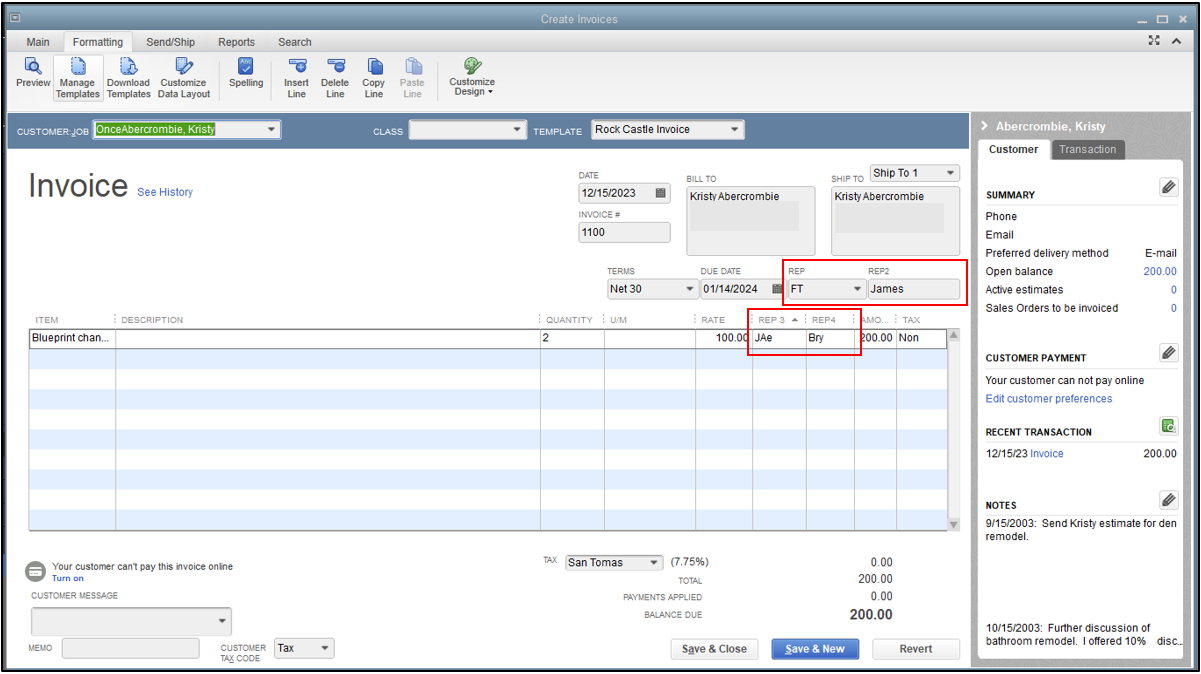
Additionally, we can manually manage the invoice template and add another column that will serve as a Rep column. Here's how:
- Go to the Customers tab in the menu bar, and click Create Invoice.
- Enter the required details, and click on the Formatting tab above the New icon.
- Select Manage Templates and choose an invoice template. Then click OK.
- In the pop-up window, select Additional Customization beside the Help button.
- On the Columns tab, tick the Other 1 and Other 2 boxes.
- Enter the title as Rep 3 and Rep 4. Then select OK to close.
I've added a screenshot for reference.
When running a Sales by Rep Detail report, the additional Rep column added in the invoice template will show as Other 1 and 2 in the header report. Please refer to the screenshot provided below.

I've added these helpful references on how to process customer payments and customize reports:
Feel free to comment below anytime you need additional assistance with the Sales Rep feature. I'd be glad to assist you. Keep safe!




