Turn on suggestions
Auto-suggest helps you quickly narrow down your search results by suggesting possible matches as you type.
Showing results for
Get 50% OFF QuickBooks for 3 months*
Buy nowIs there a way (in QBO) to run a sales report that does NOT include the product/service detail. I need sales reports that include only the total invoiced amount - not broken out by all the products and services included in the invoice.
Thanks!

Thank you for reaching out to the Community, @SondraF. I'm here to give you steps to generate a sales report that only includes the total invoiced amount without the product/service details.
Step 1: Run a report.
This opens the customization window.
Step 2: Customize a report.
You can apply multiple filters to customize your report. Most reports have the same set of filters. Some filters are only available on certain reports.
Once you have the perfect set of filters, save them so you can run the same report in the future.
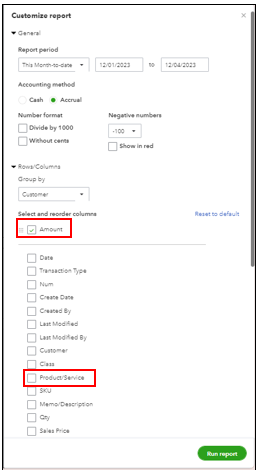
For more details, please see this article, Customize Report in QuickBooks Online.
Additionally, I will share some resources to help you get the necessary details from your reports:
Feel free to reach out if you have further questions or concerns regarding your Sales Report. Have a great day and Keep Safe!
Unfortunately, this did not work.
Hello there, @SondraF.
Allow me to chime in and clarify the steps given by my colleague regarding how to run a sales report without a product/service in QuickBooks Online (QBO).
To generate a report of the total invoiced amount, start by using the Sales by Customer Detail. To filter the report and show only the invoice details, customize it by filtering the date and setting the transaction type to "Invoice" only.
Here's how:
In addition, you can reorder the columns by clicking the Gear Icon of the reports.
I will also include a helpful article that guides you in memorizing reports: Memorize reports in QuickBooks Online.
Please feel free to leave a comment below if you have further concerns about running sales reports or other QBO-related issues. I'll be here to assist you.
@Clark_B Thank you, that worked. However, it took me some time to figure out that I must switch to "classic view" to find the "Customize" button.
So glad to hear this worked for you, SondraF.
You know where to come if you ever need a hand again in the future. Take care!


You have clicked a link to a site outside of the QuickBooks or ProFile Communities. By clicking "Continue", you will leave the community and be taken to that site instead.
For more information visit our Security Center or to report suspicious websites you can contact us here


