Turn on suggestions
Auto-suggest helps you quickly narrow down your search results by suggesting possible matches as you type.
Showing results for
Get 50% OFF QuickBooks for 3 months*
Buy now
Good evening, @spacetoursbus538.
I hope you're having a fantastic week. Estimates can be linked to Invoices if you use the Estimate to create an Invoice. You don't necessarily have to connect them, but it's easier to keep track of a customer paying if you do. The steps below will show you how to link an estimate to an Invoice:
Now you know how to add Invoices to estimates. You can also check out this article on using estimates for more helpful information.
Feel free to hit the Reply button if you have any other questions. Enjoy the rest of your week!
My estimates used to be linked to invoice. Not any more.
I create an estimate
estimate is approved
I create invoice
when I return to see that estimate again it do not show is linked to any invoice.
Hi spacetoursbus538,
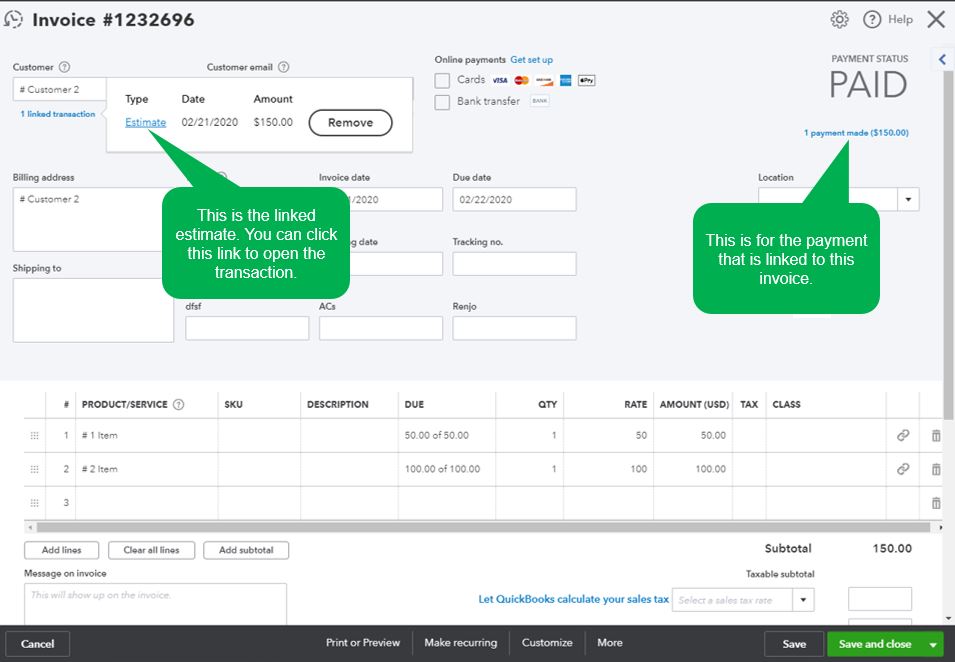
QuickBooks has updated the setting where you can view the linked transactions. Instead of opening the estimate, you can view the invoice and see the attached transaction.
Here are the steps:
I've got a sample screenshot below for reference:
I'm also adding this article for more details: Set up and use estimates.
Please let me know in the comments if you have any additional questions. Thank you.
no
I appreciate you getting back to us, @spacetoursbus538.
Currently, we have an investigation case about an estimate that should show a link to an invoice. The case code is INV-41757.
Our product engineers have identified the root cause, and a fix is scheduled for the next update v1929 product release. Please contact our Customer Care Support to attach your account on the list of affected customers. This way, you'll get an email notification once the issue is fixed by our engineers.
Let me show you how:

The next update will be on February 25, 2020.
You can still use invoices/bills to check which estimates have been linked, but not the other way around.
I'll add this article as your reference in splitting an estimate into as many invoices or invoice a customer for partial payments: Set up and send progress invoices in QuickBooks Online.
Please let me know if you have more questions. I'll keep my notifications open. Have a good one!


You have clicked a link to a site outside of the QuickBooks or ProFile Communities. By clicking "Continue", you will leave the community and be taken to that site instead.
For more information visit our Security Center or to report suspicious websites you can contact us here


