Thank you for reaching out to us, info1982.
I'm here to provide clarification on the issue so you can get back to business.
This error message usually indicates that the parent account of the sub-account you're attempting to activate in the Chart of Accounts is inactive. Sub-accounts in QuickBooks are nested within parent accounts to maintain a hierarchical structure.
To resolve this, you can follow the steps below:
- Go to the Gear ⚙ icon, then Chart of Accounts.
- Next to the printer icon, click the Settings ⚙ icon.
- Click the Include inactive checkbox.
- Then, locate the parent account associated with the sub-account, and hit Make active in the Action column
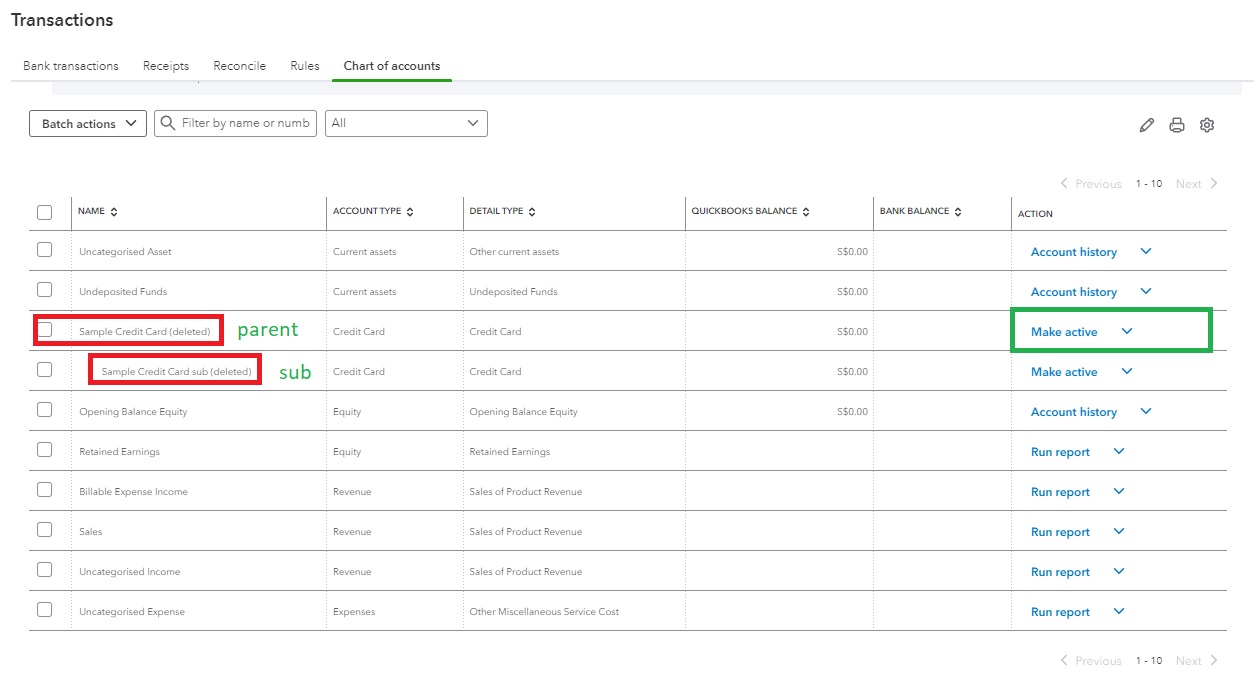
Once the parent account is active, you should be able to activate the sub-account without encountering the error message. You can also use this article as a reference: Make an account inactive on your chart of accounts in QuickBooks Online.
I've also added the following resources to help you organize your chart of accounts:
Keep me posted for any follow-up questions about the chart of accounts. I'll be here to help. Keep safe!




