Get 50% OFF QuickBooks for 3 months*

Buy now
cancel
Showing results for 
Search instead for 
Did you mean: 
Announcements
Simplify payday and set payroll to run automatically on QuickBooks. Explore QuickBooks Payroll
ChrisRoush
Level 3

SSL cert for connect.intuit.com has expired and my customers cannot pay their invoices!

Screenshot 2023-02-13 at 11.22.02 PM.pngScreenshot 2023-02-13 at 11.22.24 PM.png


*Ugh.

2 Comments 2
LieraMarie_A
QuickBooks Team

SSL cert for connect.intuit.com has expired and my customers cannot pay their invoices!

Hi there, @ChrisRoush.


I understand that these warnings may scare off your customers. 


Our engineers are already aware of this and are currently working to renew the certificate. The reason SSL certificates expires is to keep your encryption up to date. When this happens, the website shows alert messages to the users, like "Your connection is not private" or "Your communication is not secure." 


While waiting for updates, I recommend refreshing the page from time to time. If you're still getting the same error, I encourage contacting our Customer Care Team support for further assistance.


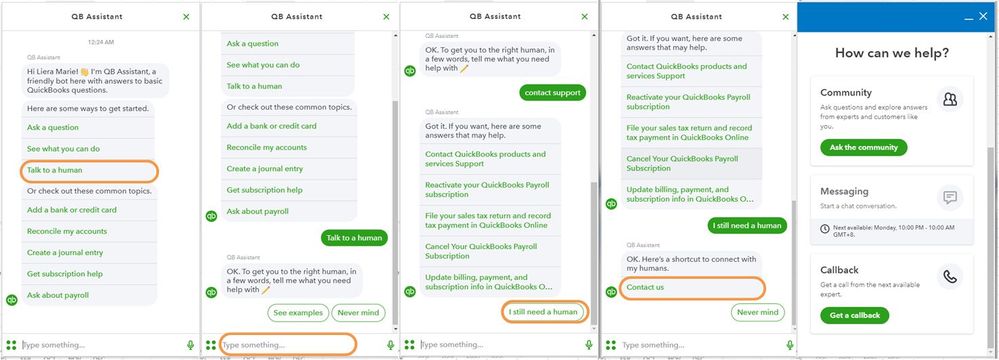
Here's how:


  1. Click the (?) Help icon in the upper right-hand corner of the Dashboard.
  2. Select Talk to a Human.
  3. Enter a short description of your concern and press Enter.
  4. Click I still need a human.
  5. Select Contact Us to connect with our live support.
  6. Choose Get a callback.
    help.JPG


Additionally, here are some articles for more tips and resources for managing your customer payments:


We'd appreciate your patience and understanding on this matter. Reach out to me again with any concerns and questions you may have. I'd be happy to help!

ChrisRoush
Level 3

SSL cert for connect.intuit.com has expired and my customers cannot pay their invoices!

There’s literally nothing I can do on my end!  What’s the point in contacting support.


Intuit should never have let an SSL cert for a payment domain expire!  DigiCert has quite the robust reminder system in place.  


What should happen here is an honest and straightforward apology by accepting responsibility for the error and recognizing that the brand reputation just took a hit.


So, get outta here with the disingenuous, out-of-the-box, cut & paste reply!

Need QuickBooks guidance?
Log in to access expert advice and community support instantly.

Need to get in touch?

Contact us