Hi there, @treasurerpnra.
At this time, creating batch invoices for multiple properties isn't available. While creating a budget is only available in QuickBooks Online Plus or Advanced version.
You can consider upgrading your QuickBooks subscription to Plus version so you can get additional features, including creating a budget. Here's how:
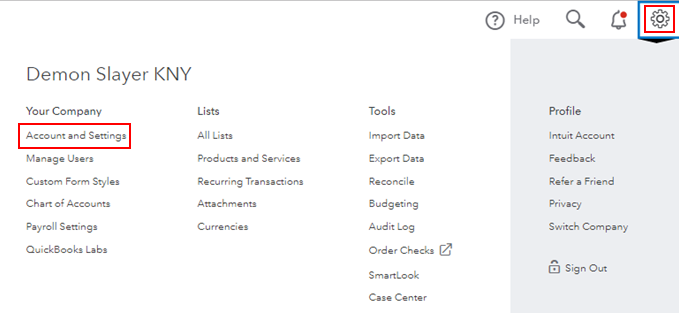
- Click the Gear icon, then select Account and Settings.
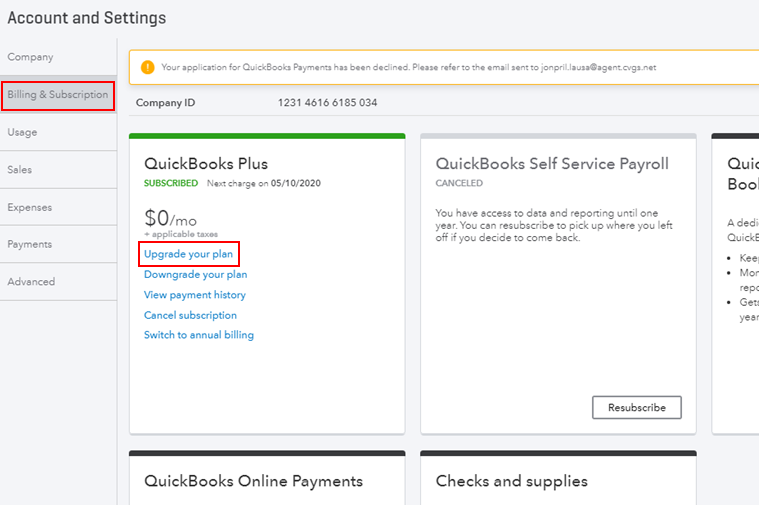
- From the left panel, select Billing & Subscription.
- Select Upgrade your plan in the QuickBooks Online section.
- Choose the Plus plan and select Upgrade.
- Confirm your payment information, then select Save.
I'm adding this article for more details: Upgrade your QuickBooks Online subscription.
As always, feel free to visit our QuickBooks Community help website if you need tips and related articles in the future.
Please touch base with me here for all of your QuickBooks needs, I'm always happy to help. Have a good day.




