We can review the transaction history to know why the transactions are posted to the checking account, ScottEd.
If transactions were manually entered or categorized in the wrong account, you can update the category or rule for these transactions so they align properly with the credit card account.
Here's how:
- Go to Transactions, then select Bank Transactions.
- From the For Review tab, change the category by choosing one from the dropdown.
- Select Confirm.
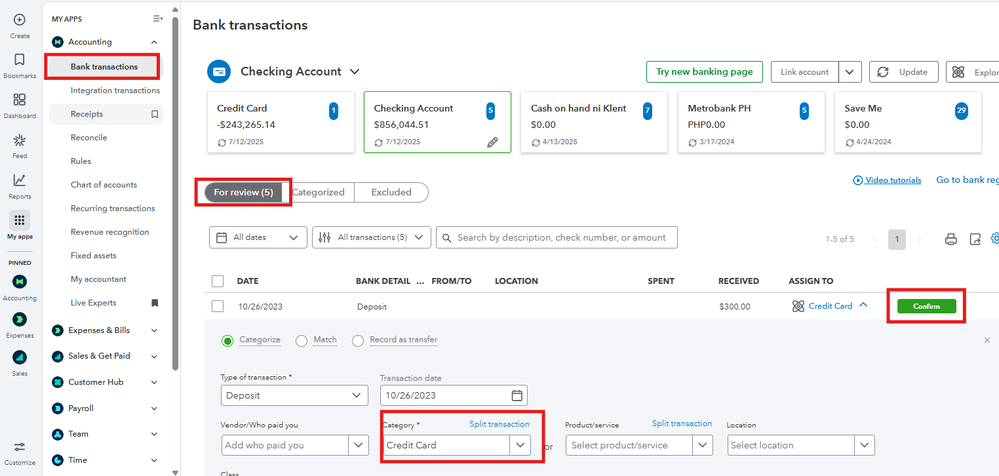
Repeat these steps for other transactions as needed. If a transaction has already been categorized, check the Audit history to view details about its description and the account it was assigned to. See screenshots for visual reference.


If you have set up automated categorization rules in QBO, a rule may be incorrectly assigning credit card transactions to the checking account. You can check for any misconfigured rules in the Banking tab under Rules and make edits or delete the rules that are causing these errors.
Once done, you can proceed to reconcile your account in QuickBooks. For detailed steps, open this link: Reconcile an account in QuickBooks Online. This guide also includes a related link to fix and print reconciliation reports.
If you need assistance categorizing transactions and reconciling your bank statements, consider partnering with QuickBooks Live Bookkeeping. This can boost your confidence in managing your finances ensuring the accuracy of your financial records and providing access to professional support.
I'll be around whenever you need help managing your QuickBooks account.




