Turn on suggestions
Auto-suggest helps you quickly narrow down your search results by suggesting possible matches as you type.
Showing results for
Get 50% OFF QuickBooks for 3 months*
Buy now
I appreciate you sharing your concern with us here, ridenastr.
For us to provide you with a resolution, I want to ensure we've got the right information about your issue. Can you share more specific details of what you meant by the receipt amount from a payment? What tasks do you want to complete? You can also provide screenshots, so I can have a clearer view and understanding of your end.
Any additional information is much appreciated, as this will help us identify further and assist you in getting this resolved.
Let us know in the comments below for any updates. I'll be around for further assistance. Have a good one!
Not sure what info you need. This has always worked before and now it is not saving the record, and the total amount goes to zero as soon as I select the Product/Service category from the dropdown menu. If I manually enter the total amount back in, the record does not save. I am stuck.
I appreciate you returning to this thread to clarify the situation, Riden.
The reason the product/service goes to zero can be due to the inputted sales price. Let's check the Product/service setup to narrow the cause of this situation.
Here's how:
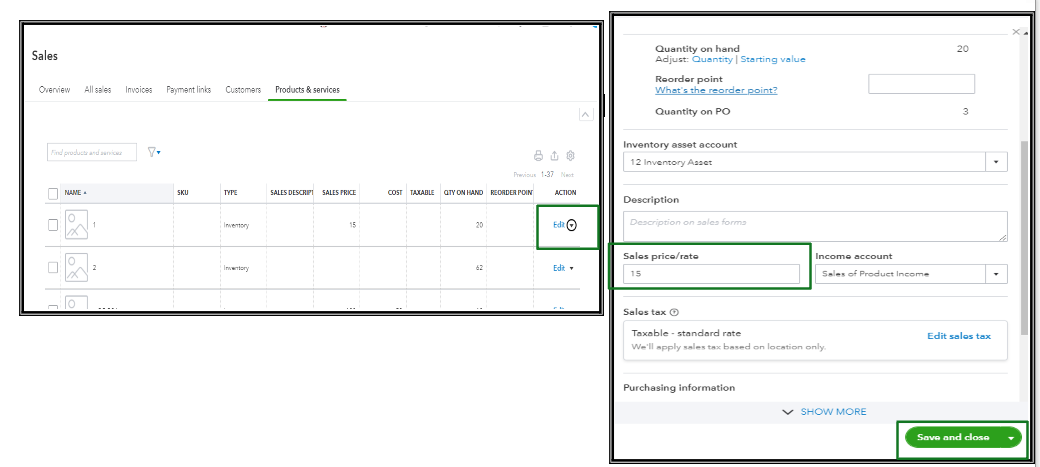
Meanwhile, when you enter the total amount, it should save it, yet this time it didn't. I recommend performing basic troubleshooting to see if it's a browser problem by opening a Private/Incognito window. Browser cache and cookies can get corrupted, leading to issues with accessing websites or files. Refer to the following keyboard shortcuts based on your browser type:
If the private browsing session works, clear the browser's cache so the system can restart. This task is also possible in other supported, up-to-date browsers. Clearing the cache will reboot the system, allowing you to work with clearing the stocked cache and cookies causing the issues.
Also, I'm adding this article to help you organize your products and services: Group products and services into different categories.
Please let us know if you still have other queries about the product/service. We're always here to help. Take care.


You have clicked a link to a site outside of the QuickBooks or ProFile Communities. By clicking "Continue", you will leave the community and be taken to that site instead.
For more information visit our Security Center or to report suspicious websites you can contact us here


