Hi there, drrichards and Nhuczko85.
I recognize the urgency of fixing the functionality of snap receipts to get you back in working order.
Before anything else, did you follow the requirements before doing a snap receipt? If so, I'd recommend power cycling your data.
Let me guide you on how:
- In your QuickBooks Online Mobile App, select the Gear icon.
- Choose the Refresh Data menu.
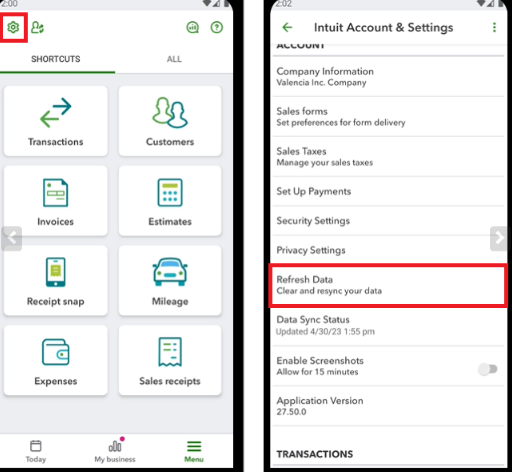
- Tap Yes.
If the issue persists, I'd recommend contacting our QuickBooks Online Support Experts. They can securely review your account to identify and solve the root cause of the issue.
Additionally, I'd like to share this article for your reference to help you manage your receipts in QuickBooks: Upload your receipts to QuickBooks Online.
If you have any questions about uploading your transactions and other QuickBooks products, don't hesitate to reply. I'm always available to help!




