Hi, @ghofranigraphics.
While the option to mark multiple invoices as paid is unavailable from the Status field, you'll want to go to the Invoices menu and then click the Triangle button from the Action column. Doing this can help you mark each invoice as paid. Take a look at the screenshot below:
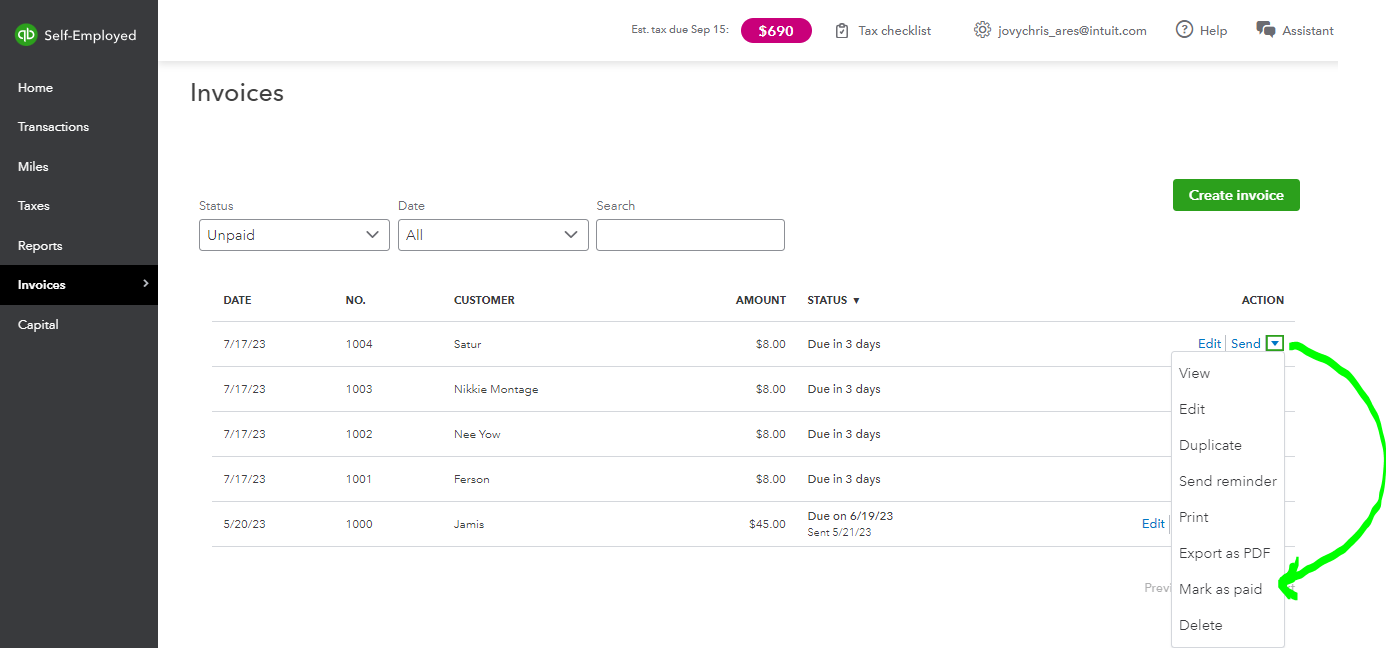
In addition, this article provides an overview of how to customize your invoice and steps to activate the payments option to let your customers pay online: Create invoices in QuickBooks Self-Employed.
I'm adding this link for future reference while working on your QuickBooks account: Schedule C and expense categories in QuickBooks Self-Employed.
Keep in touch with me if there are other things you need in QuickBooks aside from your invoices. Just leave a comment below, and I'll get back to you.




