Turn on suggestions
Auto-suggest helps you quickly narrow down your search results by suggesting possible matches as you type.
Showing results for
Get 50% OFF QuickBooks for 3 months*
Buy nowI went to run a report for my 2024 profit and loss, and everything was gone. There is nothing there.
Solved! Go to Solution.

Hi there, shery. Welcome to the Community.
When you run a Profit Loss (P&L) report and no transactions appear, it could possibly be that the filter used in the Report period is incorrect, causing no data to show. Let me show you how to filter it correctly.
Here's how:
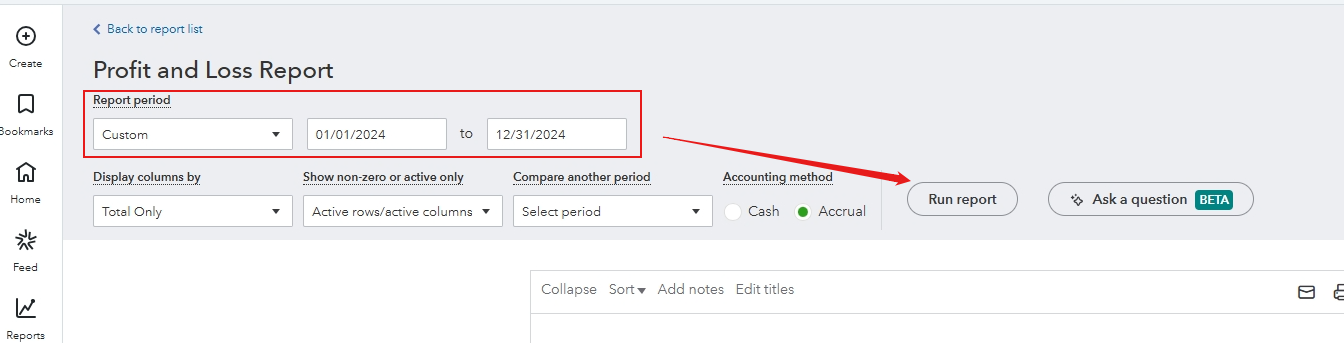
You can also use a private/incognito window when running the P&L report, as missing data can sometimes be caused by browser-related issue.
If transactions are still missing, you can review your Audit Log to confirm whether any 2024 transactions were deleted. If they were, you'll need to re-create them. You can contact your accountant to assist you with this process if needed.
We're here to help, so if you have any follow-up questions, just click the Reply button.
Hi there, shery. Welcome to the Community.
When you run a Profit Loss (P&L) report and no transactions appear, it could possibly be that the filter used in the Report period is incorrect, causing no data to show. Let me show you how to filter it correctly.
Here's how:
You can also use a private/incognito window when running the P&L report, as missing data can sometimes be caused by browser-related issue.
If transactions are still missing, you can review your Audit Log to confirm whether any 2024 transactions were deleted. If they were, you'll need to re-create them. You can contact your accountant to assist you with this process if needed.
We're here to help, so if you have any follow-up questions, just click the Reply button.
Hi, @sherylluitjens.
I just wanted to follow up to check if the resolution we provided helped resolve your issue.
Please let us know if everything is now working as expected or if you're still experiencing any problems.


You have clicked a link to a site outside of the QuickBooks or ProFile Communities. By clicking "Continue", you will leave the community and be taken to that site instead.
For more information visit our Security Center or to report suspicious websites you can contact us here


