Hello there, @slagani.
I'm here to help you access your 2024 data in QuickBooks. Even though it's now 2026, QuickBooks keeps your past data organized so you can access it anytime you need.
Follow these steps to view your information for the 2024 tax year:
- Log in to your QuickBooks account.
- Head to the Report from the left-hand navigation menu.
- Locate the Tax summary/Tax details report and click the dropdown.
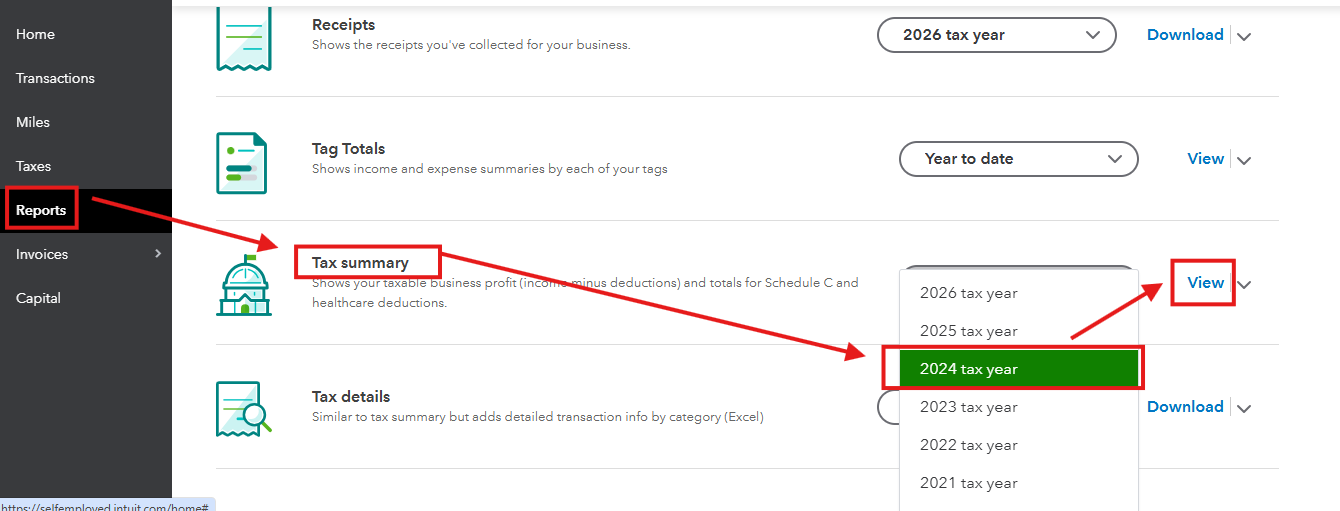
- Choose the 2024 tax year, then select View.
Since it is now January 2026, the standard window to file 2024 taxes has closed. You can file a late return via TurboTax or consult an accountant.
Don't hesitate to reach out with any questions.


