Turn on suggestions
Auto-suggest helps you quickly narrow down your search results by suggesting possible matches as you type.
Showing results for
Get 50% OFF QuickBooks for 3 months*
Buy nowFlorida will begin accepting data from QuickBooks in 2026, and I am concerned as the data on the sales tax liability report is incorrect.
When I print a Sales detail report for the previous month, the amount does not match any of the gross sales amounts on the liability report. There are Tax Names on the report that I cannot modify, no idea where they came from or why they have sales amounts.
The only accurate information on this report is the Taxable Amount and Tax Amount.
Please explain where the Gross Total and Non-taxable amounts are coming from (and how to fix the data) and how to remove tax names that are not applicable.
Thanks for reaching out to the Community for support, dLearned.
I want to make sure the data on the Sales Tax Liability report is correct in QuickBooks Online.
There are few things review and verify are correct in order to generate the data you need:
1. Verify Report Settings
Ensure the report is running on the correct parameters to match your filing period and accounting method.
2. Audit Transactions for Errors
Incorrect item setup or transaction entry is a common cause of report discrepancies.
3. Record Necessary Adjustments
If a small, unresolvable discrepancy (like a minor rounding difference or a state-approved discount/penalty) persists, you can make a sales tax adjustment.
You may also want to reach out to an accountant to go over this info with you. If you don't currently have one you can find one in your area specifically trained in QuickBooks by searching her: Find a ProAdvisor.
If you need a hand or have questions about anything else please don't hesitate to reach. I'll do my best to help in any way that I can.
You haven't answered the questions, but I will attach a copy of the liability report and you can explain it to me.
Our total sales for December were $86776.75. Non-taxable sales were $59800.00. Taxable $26978.75.
These are the numbers that the state requires, in addition to the taxable amounts subject to surtax.
The total sales will be the Gross Total of "Florida State" (no idea where this tax name came from or why there is data here) and "State Tax". These two do total $86776.75.
The total non-taxable is the same (Florida State plus State Tax). None of the other values under non-taxable are relevant.
The taxable amounts are correct, as is the tax amount.
Since the state requires Total Sales, Exempt Sales and Taxable Sales values, what is Quickbooks going to use? Why are the amounts appearing in multiple rows, and why are there extra values?
Hello there, @dLearned. I appreciate the details you provided from your Sales Tax Liability report.
The Gross Total and Non-Taxable amounts in your report are being calculated based on the transactions linked to the tax names listed on the report.
To identify the source of these figures, I recommend clicking the amounts to see what entries contribute to the totals. You can also review the item tax settings and individual transaction details to ensure sales are properly categorized as taxable or non-taxable.
Some tax names might seem unfamiliar, but they are typically tied to specific jurisdictions that require tax calculations. QuickBooks Online may automatically add these based on your location or transaction details.
To review this further, it would be best to contact our Live Support team. They can help check transactions to trace these amounts, confirm tax names, and ensure your account meets Florida’s tax rules.
Here's how:
Let us know if you have additional questions. We're always here to help.
I have also experienced this for other states. It's SOOOOOOO frustrating. The amounts on the sales tax liability report are incorrect!!!! The calculations don't make sense. Not sure how/why they have made this so difficult. It worked great in QBD.
I also would like an answer to the OP's question.
Hi there, @AccountingNinjaSD. This issue can happen when using Automatic Calculation as the chosen tax rate. I understand it’s confusing to see amounts split across multiple rows with extra tax names that don’t seem applicable to your filings. Let me clarify what’s happening and guide you through the resolution.
As mentioned by my colleagues, the Gross Total on the Sales Tax Liability report is calculated from all transactions associated with each tax rate, including both taxable and non-taxable amounts. The Non-Taxable reflects entries that use a non-taxable code.
Based on the attached screenshot, the reason amounts appear in multiple rows is that when Automatic Calculation is selected as the transaction rate, QuickBooks automatically associates taxable transactions with Florida’s combined tax system. This consists of both State Tax and County Surtax components, which explains the presence of other tax names in the report.
The gross transaction amount is displayed under each applicable tax component to ensure accurate calculations. This cannot be removed as it's part of the tax calculation engine.
To resolve this, refer to your Sales Tax Liability report and verify whether you’ve selected your Florida tax rate in the Select sales tax rate section. If Automatic Calculation is currently set, please update it.
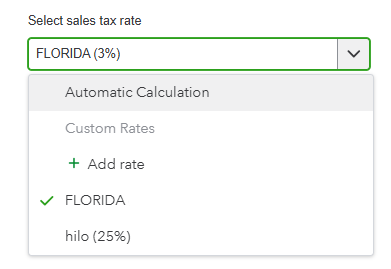
You can also click on See the math to know how your sales tax is calculated. This will display any additional local tax agencies associated with the address requiring sales tax collection.

Meanwhile, if you prefer, you can make adjustments to your Sales tax returns. However, I recommend consulting with your accountant or tax professional before proceeding, as this can affect your filings.
Please leave a Reply below if you have further questions. I'll be here to help.


You have clicked a link to a site outside of the QuickBooks or ProFile Communities. By clicking "Continue", you will leave the community and be taken to that site instead.
For more information visit our Security Center or to report suspicious websites you can contact us here


.png)