Hi there!
Need help choosing a plan? Schedule a call with our QuickBooks sales team.
Gear up for fall.
90% OFF
QuickBooks + Payroll for 6 months.*

Create, customize, and send invoices online

Automatic backups
Every day so your data is safe1


Expert Support
To help you get started and figure out new features3

Connected apps
Connect with your favourite apps

Securely access your accounting data anytime
QuickBooks uses advanced, industry-recognised security safeguards to keep all of your accounting data secure, private, and protected. It is accessible 24 hours per day, 7 days per week. Securely access and manage your books from your computer, laptop, tablet, or smartphone anytime you choose.
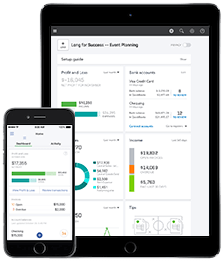
Access and manage your finances from the cloud
To successfully run a business, you need to know exactly how much money you have and how much you owe. QuickBooks is easy-to-use cloud accounting software that organizes your accounting data including payroll, invoicing, and inventory tracking into one central accounting system in the cloud. QuickBooks automatically syncs across your devices so that your accounting data is always accurate and at your fingertips.
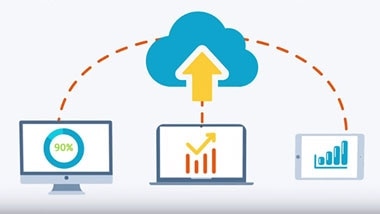
Automatic backups ensure your data is never lost
With QuickBooks cloud based accounting, there is no software to install, upgrade, or maintain. Quickbooks keeps your work safe, secure, and automatically backed up for you. Having your data automatically backed up also ensures that your files and information are always protected and accessible.

Collaborate with your accountant and colleagues
Do you have a colleague or consultant that helps you close your books monthly? Does your accountant sometimes contact you for data or other information? QuickBooks makes it easy to give access to select users. In a few clicks you can create access privileges so that your colleague or accountant can login and work with your data online. You can even login simultaneously for training purposes.
Hear what our customers have to say
70% of QuickBooks Online users agree that QuickBooks has positively impacted their time management.
82% of mobile QuickBooks Online App users believe their business has been positively impacted by using QuickBooks Online.
2 out of 3 QuickBooks Online users have seen improvement in running their business more efficiently since moving to QuickBooks Online.

"The key to me having an efficient business is being able to access all of my systems online, from wherever I am. QuickBooks Online allows me to do that with multiple users, from around the world. I can see exactly what’s happening with my business at any point in time.”
Marissa McTasney, Moxie Trades

Find a plan that’s right for you
Lite
Built for solo businesses
Was$20
$2/mo
Save 90% for 6 months*
1 user
No accountant access
Includes:
- Unlimited invoicing & estimates
- Accept payments online
- Reciept capture & mileage tracking
- Sales tax calculations
- Run basic business reports
EasyStart
Build your financial foundation
Was$30
$3/mo
Save 90% for 6 months*
1 user
Plus access for your accountant
Intuit Intelligence
- Categorizes your transactions
- Flags potential tax issueswith Sales Tax AI
- AI chat for instant insightsBetaLimited queries per month
Everything in Lite, and:
- Run general reports
- Unlimited bank connections
- Phone and chat support
Best value
Plus
Boost efficiency and profitability
Was$110
$11/mo
Save 90% for 6 months*
Up to 5 users
Plus access for your accountant
Intuit Intelligence
- Finds and fixes errorswith Accounting AI
- Sources leads and follows upwith Customer AI
- Creates invoices in bulk, automaticallyBeta
Everything in EasyStart, and:
- Run enhanced business reports
- Plan budgets
- Track inventory
- Project profitability
- Multi-currency
- Track classes and locations (up to 40)
Advanced
Scale with greater customization
Was$220
$22/mo
Save 90% for 6 months*
Up to 25 users
Plus access for your accountant
Intuit Intelligence
- Gives tailored financial insightswith Finance AI
- Pre-fills details to start work fasterwith Project Management AI
- Customize dashboards with personalized KPIs and metrics to measure what matters mostNew
Everything in Plus, and:
- Customize user permissions and access
- Workflow automation
- Sync data from Excel
- Revenue recognition
- Track classes and locations (unlimited)
- Priority support and on-demand training
- Backup and restore your data
Compare all features
Lite
$20$2/mo
EasyStart
$30$3/mo
Best value
Plus
$110$11/mo
Advanced
$220$22/mo
Intuit Intelligence
| Feature | Lite | EasyStart | Plus | Advanced |
|---|---|---|---|---|
| Automates your expense categorization with improved accuracy. | Not included | Included | Included | Included |
| Gives personal, contextual answers to drive growth—and helps automate workflows.BETA | Not included | Included | Included | Included |
| Create custom automations with Intuit Intelligence via chat, or select a suggested template to automate tasks you do often.BETA | Not included | Included | Included | Included |
| Catch errors quickly and stay compliant with AI support that identifies discrepancies and provides recommendations for reconciliation.** | Not included | Included | Included | Included |
| Automates workflows to keep your books clean and up-to-date. | Not included | Included | Included | Included |
| Draft invoices for quick review through simple chat, and send prioritized payment reminders for unpaid items on approval.BETA | Not included | Not included | Included | Included |
| Turn interest into new business automatically. Customer AI helps you manage leads, follow-ups, and proposals to help accelerate your growth.** | Not included | Not included | Included | Included |
| Surfaces trends, anomalies, and what's causing them in plain language, personalized to your business. | Not included | Not included | Included | Included |
| Make faster, data-backed decisions and plan for the future with an AI planning agent that analyzes progress toward your KPIs and delivers scenario planning specific to your business.** | Not included | Not included | Not included | Included |
| Get projects started faster by automatically creating drafts with key details pre-filled.** | Not included | Not included | Not included | Included |
Accounting
| Feature | Lite | EasyStart | Plus | Advanced |
|---|---|---|---|---|
| QuickBooks learns how you categorize income and expenses and then automatically matches and records transactions from then on. | Included | Included | Included | Included |
| Automatically sort business expenses into tax categories to keep more of what you earn. | Included | Included | Included | Included |
| Connect your bank accounts directly to QuickBooks to automatically sync transactions for accurate, real-time data. | 2 bank connections | Included | Included | Included |
| Record transactions in other currencies without worrying about exchange rate conversions. | Not included | Not included | Included | Included |
| Easily track deferred revenue for accurate reporting and compliance. | Not included | Not included | Not included | Included |
| Automatically track fixed asset values, access all fixed asset info in one spot, and get insights about what may come next. | Not included | Not included | Not included | Included |
Expenses
| Feature | Lite | EasyStart | Plus | Advanced |
|---|---|---|---|---|
| When you pay vendors, QuickBooks records the transaction and matches it for you.** | Included | Included | Included | Included |
| Snap photos of your receipts and categorize them on the go. | Included | Included | Included | Included |
| Automatically track kilometres, categorize trips, and get sharable reports. | Included | Included | Included | Included |
| Organize and track your business bills online. | Not included | Not included | Included | Included |
Sales & Get Paid
| Feature | Lite | EasyStart | Plus | Advanced |
|---|---|---|---|---|
| Customize estimates, accept mobile signatures, see estimate status, and convert estimates into invoices. | Included | Included | Included | Included |
| Accept credit cards and bank transfers in the invoice with QuickBooks Payments, get status updates and reminders. | Included | Included | Included | Included |
| Sales tax is calculated and tracked for you so you can file confidently with the CRA. | Included | Included | Included | Included |
| Automatically invoice clients who have regularly-scheduled orders. | Not included | Not included | Included | Included |
Customer Hub
| Feature | Lite | EasyStart | Plus | Advanced |
|---|---|---|---|---|
| Centralize all customer information and filter for insights with custom fields. | Included | Included | Included | Included |
| Keep an organized list of notes and to-dos for each customer—with automated reminders that you can assign to specific employees. | Included | Included | Included | Included |
| Capture referrals, testimonials, feedback, and work requests from your customers. | Not included | Not included | Included | Included |
| Track new leads and existing customer opportunities in one place—and view their status in the sales cycle. | Not included | Not included | Included | Included |
| Upload and store contracts and get e-signatures from your customers. | Not included | Not included | Included | Included |
| Create professional-looking proposals with your branding, custom fields, and e-signatures. Track status and set follow-up reminders to keep deals moving with ease.BETA | Not included | Not included | Included | Included |
Time
| Feature | Lite | EasyStart | Plus | Advanced |
|---|---|---|---|---|
| Enter employee time by client/project and automatically add it to invoices. | Not included | Not included | Included | Included |
Project Management
| Feature | Lite | EasyStart | Plus | Advanced |
|---|---|---|---|---|
| See how every project is tracking, so you can control costs and maximize profit. | Not included | Not included | Included | Included |
| Automatically create projects and track work with continuous project cost allocation, helping keep you more on time and on budget. | Not included | Not included | Included | Included |
Inventory
| Feature | Lite | EasyStart | Plus | Advanced |
|---|---|---|---|---|
| Track products, cost of goods, see what’s popular, create purchase orders, and manage vendors. | Not included | Not included | Included | Included |
| Create and send purchase orders to your vendors whenever you need to buy supplies, then add it to a transaction so your books are up to date. | Not included | Not included | Included | Included |
| Keep track of items you agreed to sell to customers in the future. | Not included | Not included | Included | Included |
Business Intelligence
| Feature | Lite | EasyStart | Plus | Advanced |
|---|---|---|---|---|
| Shows your historical cash flow and helps you plan for the future. | Included | Included | Included | Included |
| Tracks performance on your KPI scorecard using a library of pre-built metrics and custom KPIs.NEW | Not included | Not included | Basic | Unlimited |
| Consolidates key metrics into interactive dashboards with customizable charts and AI-powered summaries.NEW | Not included | Not included | Basic | Unlimited |
| Create budgets with real-time data you can collaborate with your team on. | Not included | Not included | Included | Included |
| Use your historical financial data to analyze trends and create projections of future outcomes, so you can make better-informed business decisions. | Not included | Not included | Not included | Included |
| Build and save reports that are tailored to your business needs. | Not included | Not included | Not included | Included |
| Seamlessly send data back and forth between QuickBooks Online Advanced and Excel for more accurate business data and custom insights. | Not included | Not included | Not included | Included |
Connected Platform
| Feature | Lite | EasyStart | Plus | Advanced |
|---|---|---|---|---|
| Invite your accountant to access your books, control user-access levels, and share reports without sharing a log-in. | 1 | 1 | 5 | 25 |
| Enter transactions, record expenses, invoice customers, and send reports anywhere. QuickBooks automatically backs up your data to the cloud and syncs across all your devices. | Not included | Included | Included | Included |
| Keep track of your high-level business performance, with real time updates on what needs your attention. | Included | Included | Included | Included |
| Eliminate manual data entry by integrating apps you already use with QuickBooks Online, so data flows in automatically, and you can see everything in one place. | Included | Included | Included | Included |
| Your work is automatically saved as you go. When you exit a page with unsaved changes, we'll remind you to save before you close. | Included | Included | Included | Included |
| Run and export reports including profit & loss, balance sheets, accounts payable and accounts receivable. | Basic | General | Enhanced | Comprehensive |
| Create and manage users and pre-defined roles, assigning them specific access levels to various areas of QuickBooks. | Not included | Not included | Basic | Custom |
| Tailor QuickBooks to your business with custom fields that you can use to capture specific customer, vendor, employee, product, and service details. | Not included | 4 | 4 | 12 |
| Measure which products, services, and locations are generating the most revenue for your business—and which can be optimized to perform better. | Not included | Not included | Up to 40 | Unlimited |
| Save time and mitigate risk with automated workflows and set reminders for improved cash flow and more. | Not included | Not included | Not included | Included |
| Create invoices, enter, edit, and send multiple invoices faster. | Not included | Not included | Not included | Included |
| Continuously and automatically back up your changes, restore a specific version of your company, and view version history. | Not included | Not included | Not included | Included |
| Front-of-the-line support over phone and chat. | Not included | Not included | Not included | Included |
Payroll Core
Was$30
$3/mo
Save 90% for 6 months*
+ $5/employee/mo
Take care of payroll
Payroll Premium
Was$55
$5.50/mo
Save 90% for 6 months*
+ $8/employee/mo
Take care of payroll
Track hours worked
Payroll Elite
Was$80
$8/mo
Save 90% for 6 months*
+ $15/employee/mo
Take care of payroll
Track hours worked
SUI checkout mounts here
Call Sales: 1-888-829-8589


Intuit Intelligence

Try asking: