Turn on suggestions
Auto-suggest helps you quickly narrow down your search results by suggesting possible matches as you type.
Showing results for
Get 50% OFF QuickBooks for 3 months*
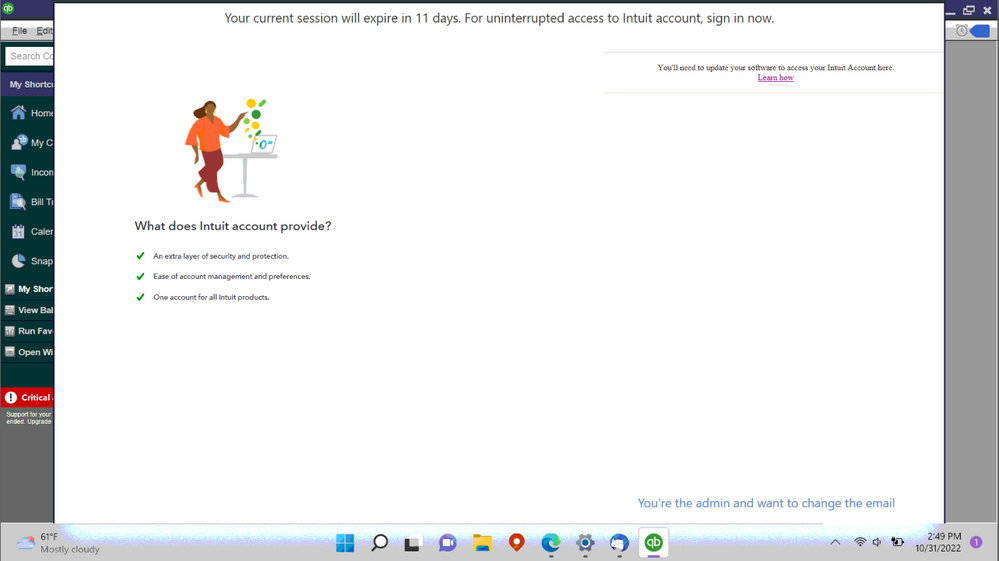
Buy nowEvery time after I open quickbooks desktop pro 2018 it says Your current session will expire in X days. For uninterrupted access to intuit account, sign in now. Except I can't sign in. Initially there's a spinning circle in the right side but then it goes away and its just a blank white page. It also says you'll need to update your software to access your Intuit account here. I already downloaded and installed the webpatch and it makes no difference. This makes qb unuseable since the only way to close the window is to use task manager and the closes quickbooks. Whats the solution?

I lowered the screen zoom from 150% to 125% and now theres on X on the window, then it gives me an option to cancel. This lets me into QB but it still doesn't let me sign into the Intuit Account so I expect the problem will come back.
Thanks for reaching out to us, sturdyfence.
Let me share with you some details about the message requiring you to log back into your Intuit account in QuickBooks Desktop.
The improved security and protection are being introduced for the QuickBooks Desktop software user by requiring you to access your Intuit Account once every 180 days when opening the company file.
To access your Intuit Account inside QuickBooks, you'll have to upgrade your software to any of the supported versions of QuickBooks since QuickBooks Desktop Pro 2018 is no longer supported.
Alternatively, you can access your Intuit account from a web browser. I'll show you how.
For your reference, you can read this article for more insights: Set up and use Intuit account user management in QuickBooks Desktop.
You can always visit our website if you require additional useful sources in the future: QuickBooks Help Articles page.
If there's anything else I can help with. Just drop a comment below and I'll be happy to assist you. Have a great day.
I can log into my Intuit ID in my web browser, but when I switchover to QB 2018 window, QB 2018 still gives me the same error when I try to email an invoice - that I need to login Intuit ID.
QB2018 does not recognize that I am logged in via website. You must login within the QB2018 software for it to recognize that you are logged into Intuit ID account.
I have updated to R17_19 QB2018 - and still having same problem - cannot send customer invoice email because cannot login Intuit ID.
I've reset all updates, reinstalled QB2018, logged in as admin, restarted computer, signed into Intuit on browser, and still have problem.
I have updated to R17_19 QB2018 - and still having same problem - cannot send customer invoice email because cannot login Intuit ID.
Your version is outdated and they have disabled the feature to send forms (e.g invoices) by email.
I agree with Fiat Lux - ASIA. Allow me to share additional information about unsupported products.
QuickBooks Desktop discontinues its add-on services like sending sales forms every three years. That said, you will no longer have access to online transactions including, emailing invoices to your customers.
Please know now that you can still utilize the software in managing your books. However, entries such as invoices need to be sent manually outside of the program. To download them, just click the Print icon then select Save as PDF.
To learn more about this topic or in case you'd like to upgrade your plan, feel free to check out this reference: QuickBooks Desktop service discontinuation policy.
We're always ready to lend a helping hand if you have any other concerns or product-related questions. Just leave a reply below, and I'll get back to you as soon as I can. Keep safe and have a great rest of the day.


You have clicked a link to a site outside of the QuickBooks or ProFile Communities. By clicking "Continue", you will leave the community and be taken to that site instead.
For more information visit our Security Center or to report suspicious websites you can contact us here