Turn on suggestions
Auto-suggest helps you quickly narrow down your search results by suggesting possible matches as you type.
Showing results for
Get 50% OFF QuickBooks for 3 months*
Buy nowI canceled last year, but I see an autopay in my bank account this month! Why was I charged and how do I get refunded???

So how can I get ahold of someone?
I can see the urgency of getting your billing issue resolved, @jb01.
Let me route you to the best support, who can check the status of your QuickBooks Online (QBO) subscription and help you manage it accordingly.
Since the Community is a public forum, and we'll need to collect some personal information to pull up your account, I encourage you to reach out to our Customer Care team. They have the tools to verify your subscription status and process the necessary refund on your behalf. To do this, here's how:
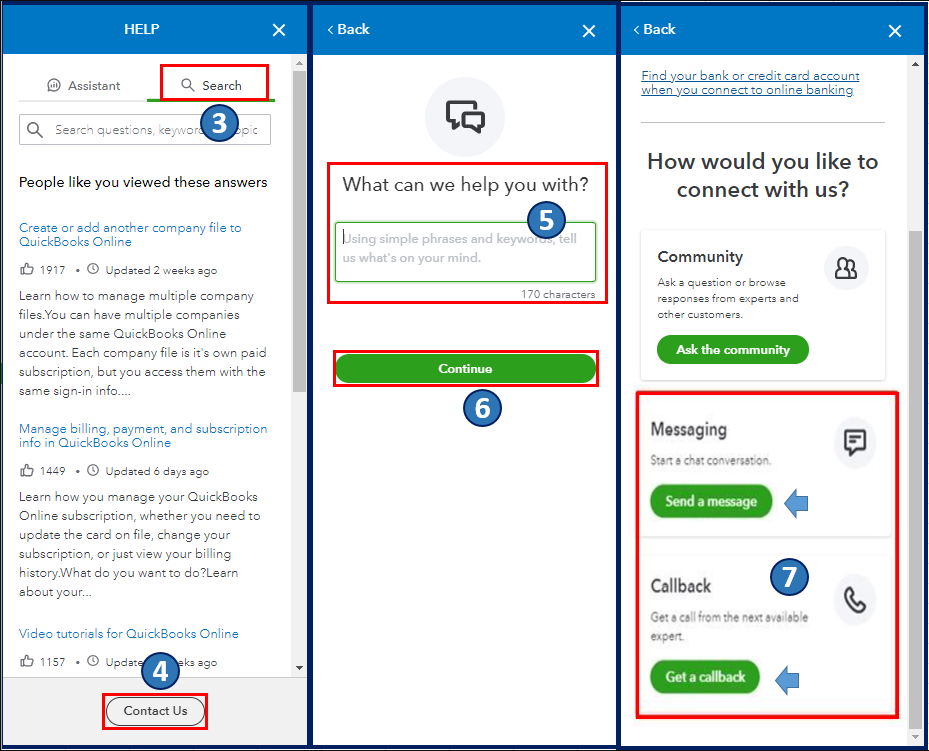
Also, you have read-only access to your QBO data for one year after you cancel your subscription. You may want to check out this article as your reference to learn more about data availability and export policies after cancellation in QBO: What happens to my QuickBooks Online data after I cancel?.
Please feel free to leave a comment below if you have other account management concerns in QBO. I'm always ready to help. Take care, @jb01.
I was charged and this account was closed. Please return funds.
Hello, Ryan.
Getting an unexpected charge after closing an account can be confusing, but I'm here to guide you on how to look into this.
To start, I suggest looking up the specific charge details then look up your charge here on this article: Understand Intuit charges on your credit card or bank statement. If you have any other active QuickBooks subscription, sometimes a charge can be linked to a different active service.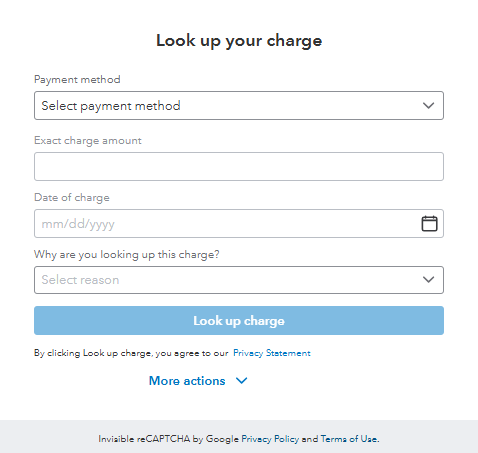
If the charge is confirmed to be for the closed QBO account and you don't have another subscription, the fastest way to get this further investigated and processed is by speaking directly with our live support team.
Here are the steps to connect with them:
1. Click the Help menu in the upper-right-hand corner of QBO.
2. Proceed to the Assistant tab.
3. Type in "contact support" in the chat box and press Enter.
4. Select Contact a human, then click Live Chat or Call me back.
5. Type in a short description of your concern and click Continue.
6. Choose between Callback or Chat.
If there's anything else we can assist you with, please don’t hesitate to reach out.


You have clicked a link to a site outside of the QuickBooks or ProFile Communities. By clicking "Continue", you will leave the community and be taken to that site instead.
For more information visit our Security Center or to report suspicious websites you can contact us here


