Turn on suggestions
Auto-suggest helps you quickly narrow down your search results by suggesting possible matches as you type.
Showing results for
Get 50% OFF QuickBooks for 3 months*
Buy now
It's nice to see you here in the Community, ameinecke. I can help walk you through pulling up the report that you need in QuickBooks Online.
Currently, there's no Sales Order feature in QuickBooks Online. However, you can create an Estimate as a replacement and later on, convert into invoices.
We can run Deposit Detail report, filter the date and the transaction type from the customize button. This way, you're able to get the specific information you need.
Here's how:
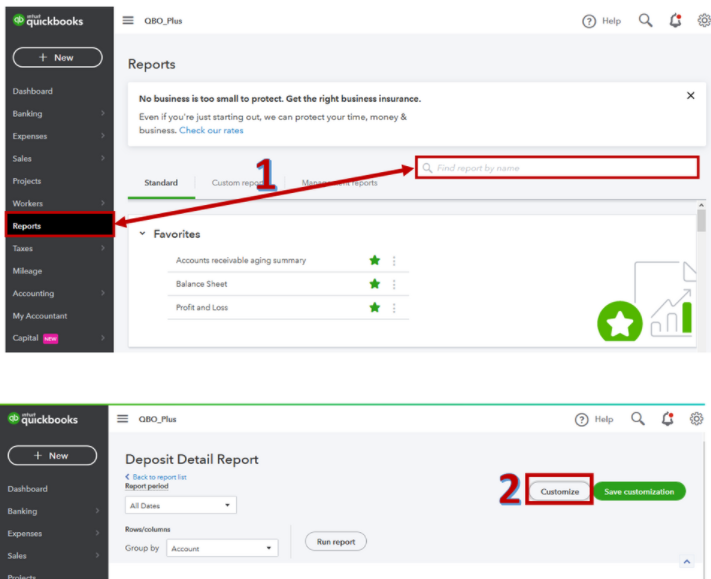
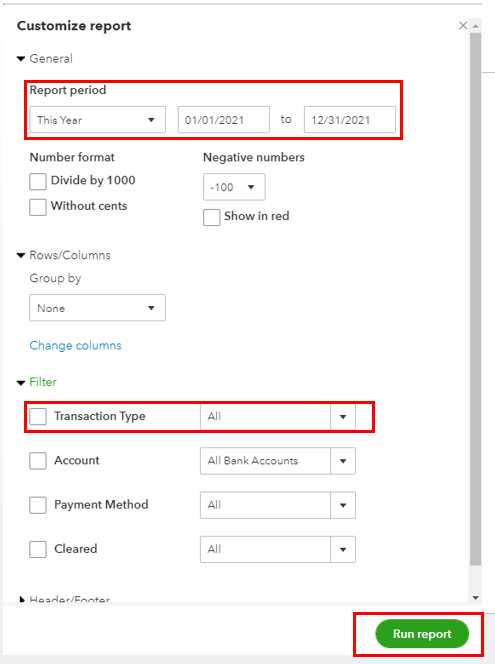
After that, you have the option to save the report's current customization settings. This way, you won't be going through the same steps again in case you'll be needing the same one.
For the step-by-step guide, you can refer to this article: Memorize reports in QuickBooks Online. It also includes details about setting a schedule and emailing a memorized report.
For the complete list of available reports in QBO, I'd recommend checking out this article: Reports included in your QuickBooks Online subscription. It provides information on which reports are accessible per QBO version.
Please get back to me if you need anything about Reports. I'll be happy to lend a hand. Have a great day!
Thank you for your response. I may be missing something, but I don't see how this is serving the way Sales Orders do. With Sales Orders, I created and Open Sales Order report. It shows me all open sales orders and their total value, not the amount of the deposit. At the bottom of the list, QB shows the total value of all open sales orders. This allows me to see the value of work in progress so we can plan ahead. With the Deposit Detail, it is only showing the amount of deposits and it doesn't just show "open" jobs. We have a long turnaround time, so I can't just pick a date and expect all open jobs to appear.
Can you tell me if there is a report that will give me the information I described?
What kind of business do you run? a manufacturing company, construction, or else? You may need an additional app with the sales order feature to integrate with your QBO.
I own a custom window treatment and home decor company. We design and fabricate custom window treatments, bedding, etc. We also sell blinds, shutters and shades that we purchase from various vendors. It is unfortunate that I would have to incorporate and pay for another app just to be able to get this report.
I am trying really hard to convert our desktop QB to Online, but it continues to lack the features I need. Unfortunately, I was told yesterday that I cannot try the free month because I did it last year. QB is making it really difficult to make this transition.


You have clicked a link to a site outside of the QuickBooks or ProFile Communities. By clicking "Continue", you will leave the community and be taken to that site instead.
For more information visit our Security Center or to report suspicious websites you can contact us here


