Hi, Elisabeth. I'm here to ensure you can generate a journal entry report for the year in QuickBooks Online (QBO).
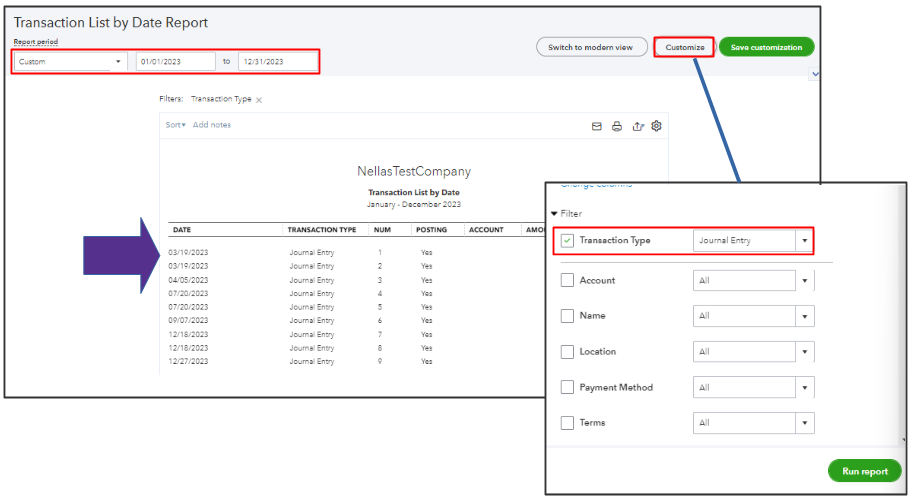
We can pull up a Journal Report for the year by filtering the date to include all entries. You can also use the Transaction List by Date to pull up a list of journal entries by customizing the transaction type and adjusting the date. See the screenshot below for your guide.
If you're having trouble generating these reports, the issue might be browser-related. Too much cache buildup can cause unexpected behavior. Let's try signing into your account using a private or incognito window:
- Safari: Command + Shift + N
- Mozilla Firefox: CTRL + Shift + P
- Google Chrome: CTRL + Shift + N
- Microsoft Edge: CTRL + Shift + N
After signing in, please pull up the journal report again. If it works, return to your regular browser and clear its cache. If the issue remains, use other supported browsers as an alternative.
Once everything's fine, you may visit these references to learn how to save the report setting and print it for future use:
If you have any more questions or concerns about managing your journal entries in QuickBooks, feel free to reply below, Elisabeth. I'm here to help.




