Turn on suggestions
Auto-suggest helps you quickly narrow down your search results by suggesting possible matches as you type.
Showing results for
Get 50% OFF QuickBooks for 3 months*
Buy nowI was working on reconciling some accounts and logged off, when I tried to log back in, my company, on the Choose Your Company page, it only shows a copy of my company that I closed in 2021 for accounting purposes. Is anyone else having this issue?
I have tried calling QB support, but every time the robot tries to connect me to a person, it hangs up.

Hi there, James.
We appreciate you reaching out to our live support to resolve this issue. Rest assured, we will help you resolve this issue.
Since you’ve already contacted Live Support, they might not be available right now because it’s the weekend. You can check this site for current support hours and how to contact them: QuickBooks Online Support.
For now, let’s try some simple troubleshooting steps to make sure the problem isn’t caused by your browser. The easiest way to do this is to log in to your account in incognito mode, which prevents cached files from interfering with QuickBooks. Here are the shortcut keys you can use:
If the issue persists, try accessing your account using a different supported browser or device, as the one you’re currently using may be experiencing a temporary issue with QuickBooks.
You can read this article for easy steps to update your Intuit account login details after you log in, to keep your information protected.
If you have additional questions, feel free to comment below.
I have tried it on Chrome, Edge, and my phone, and all of them show the cancelled company but not the active company. The only way I can access my active company's account is through the QuickBooks app, which is not viable for my day-to-day.
This does not seem like a browser issue, as it pulls up my old, cancelled company. If there was an issue with the browser, I would imagine the page would not load or something like that, not show one company but not the other.
I appreciate your efforts in performing the troubleshooting steps to access your QuickBooks company account, JamesB4.
Another reason your active company is not appearing on the web browser could be that it was hidden. If you click the Hide option on the web platform, your account will remain visible on the mobile app because the two platforms are different. To resolve this, please go to the View My Hidden Companies page and unhide the account.
You can refer to this screenshot for reference:
Alternatively, you can access your active company account via accounts.intuit.com and navigate to the Products & Billing section. From there, you can view other products linked to your accounts associated with your email and select the correct active company username to log in. 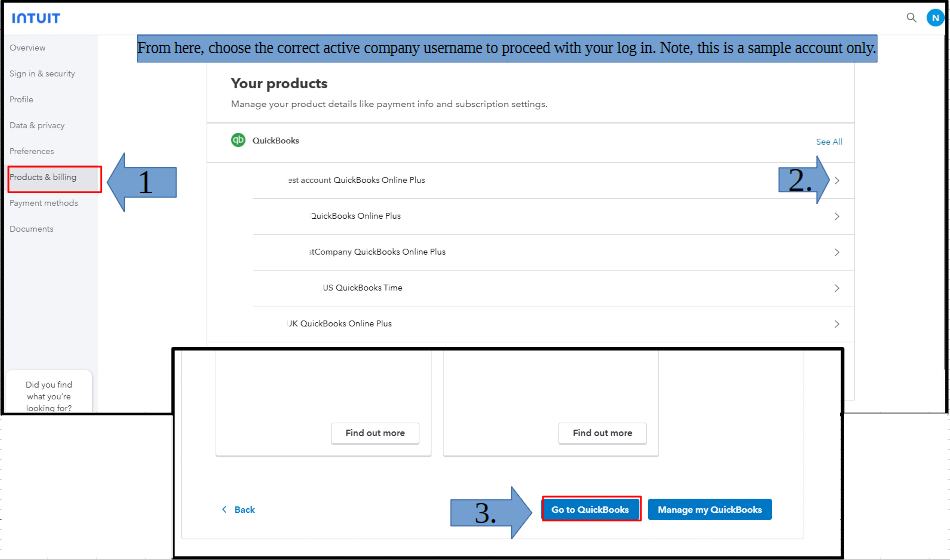
On the other hand, I suggest reaching out to our QuickBooks Live Support team. They have the specialized tools to securely check with your account and resolve this issue effectively and efficiently.
For follow-up questions, leave a comment below.


You have clicked a link to a site outside of the QuickBooks or ProFile Communities. By clicking "Continue", you will leave the community and be taken to that site instead.
For more information visit our Security Center or to report suspicious websites you can contact us here


