Turn on suggestions
Auto-suggest helps you quickly narrow down your search results by suggesting possible matches as you type.
Showing results for
Get 50% OFF QuickBooks for 3 months*
Buy now
Hi there, @coltsfannfl-yaho. I'll help you cancel your QuickBooks Online (QBO) account and get the QuickBooks Self-Employed (QBSE) version.
We're you able to start entering your transactions? You can cancel your QBO account on the Accounts and Settings page. Beforehand, I suggest saving all of your data by exporting the information. This way, it can be saved, stored, and transferred digitally if needed.
Here's how to cancel:
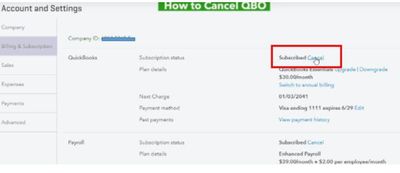
Once done, you'll get an email confirmation for the cancellation of your subscription. To give you more insights about canceling an account, please visit these links:
After that, you can sign up for a new QBSE account. Here's how:

You can easily manage your payment and plan details from your account. Just go to the Billing info tab from the Settings menu. For more information, check out this article: Update Your QBSE Billing & Subscription Details.
Feel free to comment below if you need help with starting your company. I'm always here to help. Take care and have a good one.
You have to cancel your QBO account as the first step and then open a new blank QBSE account if you want to use the same email address.
https:// quickbooks.grsm.io/US
https:// quickbooks.grsm.io/us-promo
Hi @coltsfannfl-yah,
Hope you're doing great. I wanted to see how everything is going about creating a new QBSE account. Was it resolved? Do you need any additional help or clarification? If you do, just let me know. I'd be happy to help you at any time.
Looking forward to your reply. Have a pleasant day ahead!


You have clicked a link to a site outside of the QuickBooks or ProFile Communities. By clicking "Continue", you will leave the community and be taken to that site instead.
For more information visit our Security Center or to report suspicious websites you can contact us here