Turn on suggestions
Auto-suggest helps you quickly narrow down your search results by suggesting possible matches as you type.
Showing results for
Get 50% OFF QuickBooks for 3 months*
Buy now
Hi there, rebecca71.
I'll make sure you'll be able to move the payments back to where they were before in QuickBooks Online (QBO).
We can simply go back to the banking page and undo the transactions from there. Let me show you how:
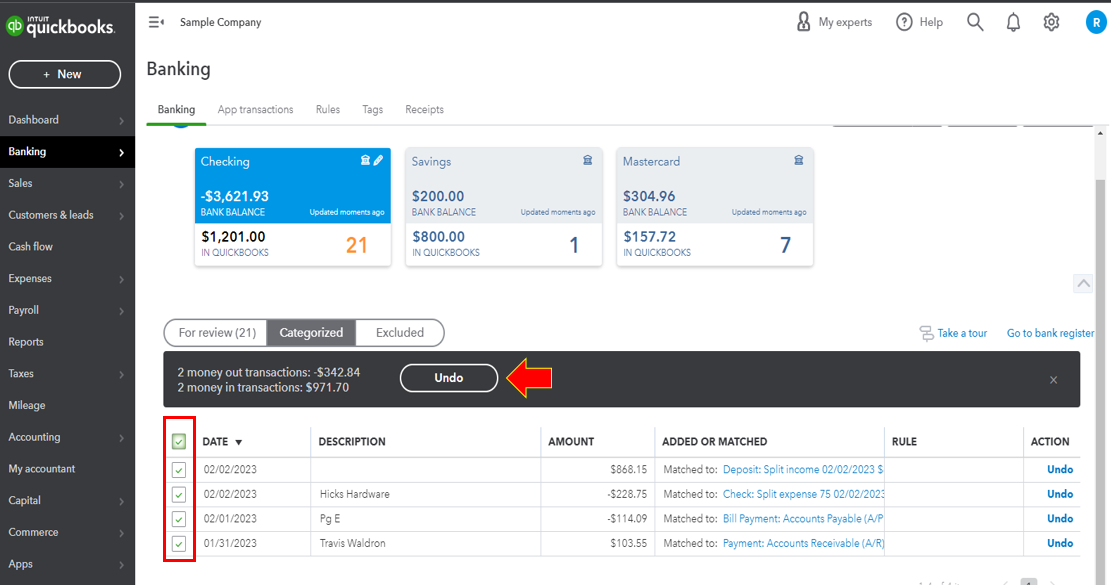
These transactions will then be moved back to the For Review section.
I'm also adding these great articles that you can check for additional reference about organizing transactions in QBO:
Also, I've attached this article that can help guide you in reconciling your accounts in your QuickBooks Online (QBO) account: Reconcile Accounts in QuickBooks Online.
Keep your post coming if you need more help undoing transactions in QBO. I'm always here to help. Have a good one!
Thank you!
You're welcome, @rebecca71.
We are happy to hear that my colleague has solved matters for you. We'd be delighted to assist you with your QuickBooks account anytime.
You can always refer to our Help Articles for further assistance whenever needed. There are a variety of QuickBooks-related topics and instructions here.
If you have any questions, please don't hesitate to post them in the Community. We're available 24/7 to tend to each query you have.


You have clicked a link to a site outside of the QuickBooks or ProFile Communities. By clicking "Continue", you will leave the community and be taken to that site instead.
For more information visit our Security Center or to report suspicious websites you can contact us here


