Let me help ensure that everything is being recorded correctly for you, Rob.
To ensure that the receipts you assign to a project accurately reflect in your Project dashboard and contribute to its profitability tracking, it's crucial to verify that the proper settings in your QuickBooks Online (QBO) account are enabled. Please confirm the following settings below:
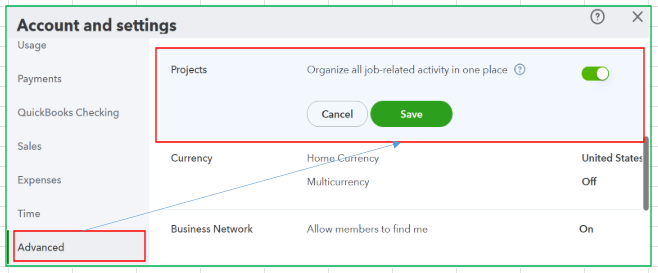

When you upload or enter a receipt in QBO, ensure you record it as an Expense or Bill transaction. In the transaction form, choose the correct project in the Customer/PROJECT column within the Item details.

If you have attached receipt images, please verify that the corresponding transaction is linked to the uploaded receipt and that the correct project is selected. If you are viewing the project’s Project Profitability or Project Details page, refresh it to see updated transactions.
If you continue to experience the issue, I recommend clearing your browser’s cache and cookies. Outdated or corrupted files stored in your browser can sometimes disrupt the project functionality in QBO. Additionally, please ensure you’re using a supported and up-to-date browser, as this can improve both performance and security when working with the software.
If you have any further questions or need assistance with other QuickBooks tasks, feel free to reply here or start a new post in the community forum.




