Welcome to the Community, aquapetcremation!
The ability to adjust fonts can be beneficial for your business presentation and branding. However, this option is currently unavailable in QuickBooks Online.
As a workaround, you have a couple of options to enhance your viewing experience. First, you can adjust the font size by modifying the page zoom settings in your browser to help make the text on your reports easier to read. Alternatively, you can also export reports to Excel. Once in Excel, you can fully customize the fonts and make any other adjustments that suit your business needs.
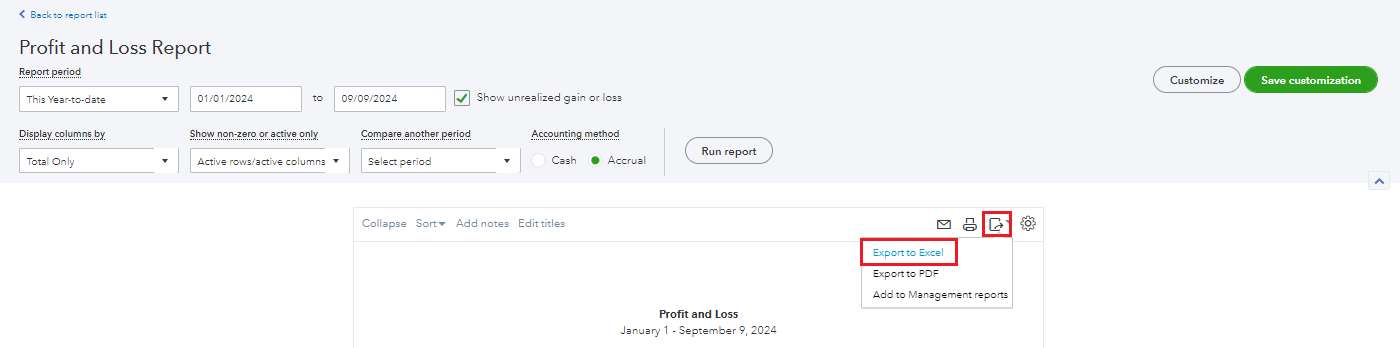
Here's how to export reports:
- On the left navigation panel, go to Reports.
- Select a report.
- Click the export icon beside the gear icon on the report.
- Choose to Export to Excel.
I'll leave this article on getting the most out of your financial report for your reference: Customize reports in QuickBooks Online.
You might also want to save a report's customization settings. Here's an article on how to do so: Memorize reports in QuickBooks Online.
Please don't hesitate to reach out if you have any further questions or need assistance exporting your reports. I'll be around to help you out, aquapetcremation.




