Turn on suggestions
Auto-suggest helps you quickly narrow down your search results by suggesting possible matches as you type.
Showing results for
Get 50% OFF QuickBooks for 3 months*
Buy now
Hello there, john.
We want to make sure you can retrieve those missing transactions. With this, we'd like to ask for further information on what specific transactions you're referring to. This helps us determine the best resolution.
We're looking forward to your reply on this. The Community is available 24/7 to back you up. Take care always!
I have the same thing happening. It's happening with my business checking acct. Anyone know why or how to fix this?
Aug 1 2022-the first of this year.
I appreciate you for joining the thread, @standberg.
Before we dig deeper into this, may I ask if those transactions went missing after importing them inside your QuickBooks Self-Employed (QBSE) company? Or are the existing business transactions inside your company file?
If these are existing bank transactions inside your account, you'll want to refresh the bank accounts. Here's how:
Also, another possible reason why you don't see them inside your company is that they've been already categorized. Inside your Transactions tab, you'll want to set it to show All types, and then in the Account section, choose your bank.
Additionally, here's an article to help you manage bank transactions: Categorize transactions in QuickBooks Self-Employed.
@standberg, let me know how it goes. I'll make sure to get back to you right away. Stay safe and have a good one!
Thank you for the reply. The transactions just weren't in there when I opened my account yesterday. They are business transactions that should be syncing automatically from my business checking. They have not been categorized yet. I did try all of what you suggested and searched for them with "all categories" selected. I also tried manually uploading then, but got the below error. What can I try next?...
We've filtered out 572 transactions that we already got through your bank connection. Looks like this file doesn't contain any valid transaction data. Check the file and try again.
Thanks for getting back here in the thread, @standberg.
May I ask the name of your bank? This way, I can check here on our system if there's an ongoing bank shortage. Also, since you've tried reuploading the transactions inside your company and failed to get through, you may want to check the file format of the bank transaction you're attempting to get into your QuickBooks Self-Employed (QBSE) company.
In QuickBooks, you'll want to ensure that your file is in the correct format. This way, the program can easily recognize the type of transaction that you'd like to be available inside your company. To learn more about this, you can check this article: Format CSV files in Excel to get bank transactions into QuickBooks.
Additionally, you can check this handy article to help you manage your bank transactions: Custom categories in QuickBooks Self-Employed.
I'll be here in the Community space if you need further assistance with this, @standberg. Take care!
Bank is Bell State. I tried uploading a csv and qbo file type.
Thanks for getting back @standberg. I'll ensure you can see your missing transactions in QuickBooks Self-Employed. This way, you can categorize them as soon as possible.
I've reviewed our reports regarding the Bell State bank, and we do not have an investigation. With this, I'd recommend uploading your CSV file with QBO format type through incognito. This way, we can ensure this is not a browser issue. Here are the shortcuts for the keyboard:
In case you need further help in uploading bank transactions, follow the steps below:
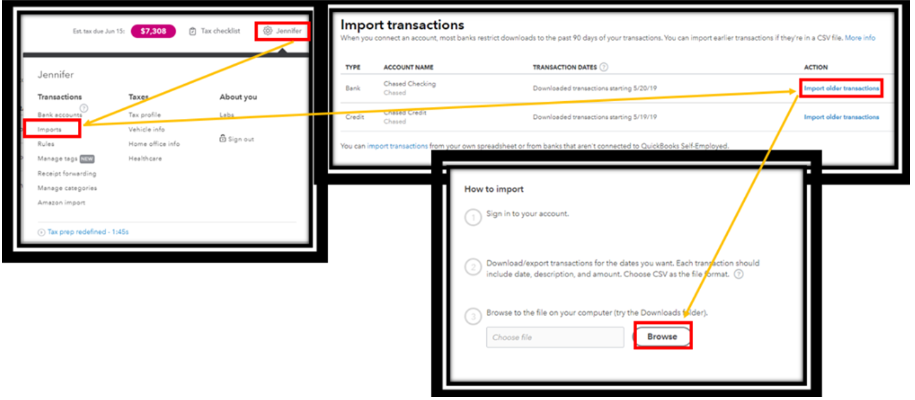
Refer to this link for more details: Manually import transactions into QuickBooks Self-Employed. Once done, manually categorize them to ensure your books and reports are always accurate.
If the problem persists, please get in touch with our Customer Service department. They can examine the issue further and provide additional troubleshooting methods. Additionally, they can submit a ticket to our engineers so they can investigate the matter. Make sure to contact them during business hours to get a quick answer.
Here's how:

Furthermore, check out these articles below on how to categorize bank transactions automatically and related matters:
It was a pleasure to help you out today. If you ever need help in the future, feel free to ask for it. I'm always eager to help. Keep safe, @standberg.
I am having the SAME issue. It is saying "We've filtered out 7 transactions that we already got through your bank connection." but the transactions it's referring to can not be found in my transaction list. I've tried all troubleshooting options I've found here and more and it the transactions are still missing. Every answer response I've seen from quickbooks regarding this issue, only explains how to troubleshoot and then how to manually import once trouble shooting doesn't work. Problem is, I do not need help manually importing as that process is simple. I need to find out WHY 1. These specific transactions aren't showing up even though transactions for the same bank are showing up before and after? (I've already refreshed by the way) 2. Why the quickbook software is telling me these transaction are already imported through bank connection? Why is quickbooks recognizing transaction as "duplicates" that are not showing up in the transaction screen? I have not seen one response that specifically answers the questions. I've only seen "work-around" solutions. This concerns me because I have no idea how many are missing overall between all my accounts. If I am paying a monthly fee for this service, I'd like to have a resolve to this or answers regarding features that are not working. Specifically features that can inaccurately reflect my income/expenses that will be reported to the IRS. Please provide assistance that resolves this issue?
having having
This is not what we want you to experience, @KEY SIGNING. I'll ensure you can see your missing transactions in QuickBooks Self-Employed (QBSE).
But before we get started, I'd like to ask what bank are you currently using. This is for me to find out if we're currently having an investigation with your bank. Any additional information will be greatly appreciated.
To proceed, I'd like to share why your transactions went missing even though the error message is telling you that the transactions were already put into QBSE.
Situations like these may occur when the connection between your bank and QBSE is interrupted. With this, I'd recommend visiting your bank's website and looking for an announcement about the change they're making, if they're currently under maintenance.
Also, let's make sure to filter the Type, Account, and Date to view All in your Transactions page since your transactions might be stuck somewhere.
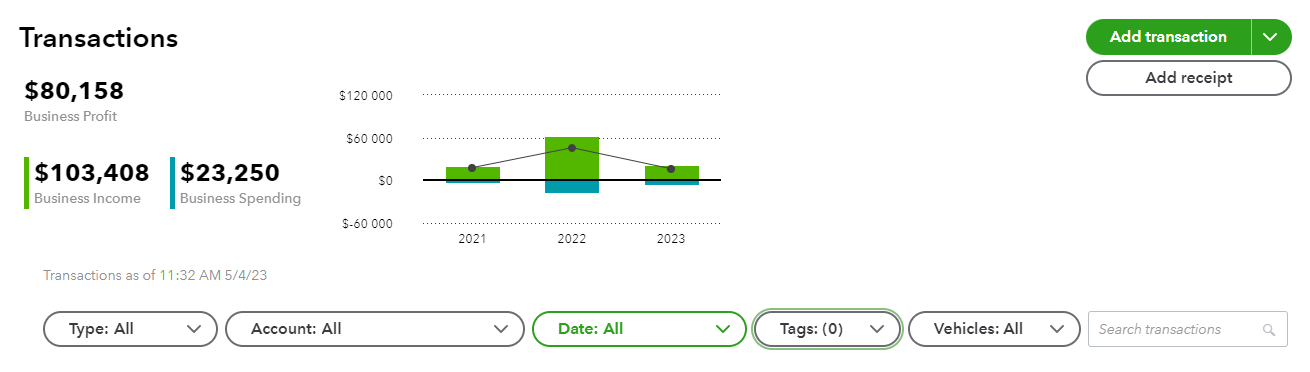
Otherwise, if the missing transactions won't show up, I would recommend getting in touch with our Customer Support so your account will be reviewed safely using their tools and provide why such is occurring.
Additionally, as a resource for managing your bank transactions and connectivity in QBSE, you might want to take a look at one of our help pages: Find help with bank feeds and reconciling accounts.
Feel free to get in touch with us if you need additional assistance with your missing bank transactions in QBSE. We'll be here to help you all the way. Keep safe.
I am also having this same issue. And was planning to contact support today, as a support page I was on said support was available Saturday from 6am to 3pm PT, but when I actually tried to connect to support now, it says only M-F hours. I have looked everywhere, refreshed all accounts, and when I try to manually enter the transactions, they disappear into the cash account instead of posting to the actual account I added them to.
Welcome to the Community, @amg8055.
Let me share information about entering transactions manually in QuickBooks Self-Employed.
QuickBooks Self-Employed (QBSE) has a default cash account. After manually entering your transactions, the program will automatically create and add them to this account.
Here is an article to help track your transactions QBSE: Manually add transactions in QuickBooks Self-Employed.
For future reference, I'm adding this article to guide you in categorizing your transactions: Categorize transactions in QuickBooks Self-Employed.
Feel free to click the Reply button below if you have questions about entering transactions manually in QuickBooks Sele-Employed. I'm always here to help. Have a great day.
I'm missing July 2023 - Nov 2023. I got behind categorizing and when I went to catch up those months were missing. I refreshed and updated and still missing
Let me help you with these missing transactions, JAN777.
When you link your bank account with QuickBooks, your recent transactions download automatically. Usually, most financial institutions permit downloading the last 90 days of transactions. If you can't find the data for July to November 2023, it could be because it's older than 90 days.
To get the missing entries, you can add them manually using a CSV file from your bank. Then, follow the steps below to import it to QuickBooks:
I'll also add this article to help you enter single transactions: Manually add transactions in QuickBooks Self-Employed.
Comment below if you have further questions about managing your transactions. I'll be around to assist you. Take care!
I am having the SAME issue. It is saying "We've filtered out xx transactions that we already got through your bank connection." but the transactions it's referring to can not be found in my transaction list. I've tried all the troubleshooting options I've found here and more and the transactions are still missing. Every answer response I've seen from QuickBooks regarding this issue, only explains how to troubleshoot and then how to manually import once troubleshooting doesn't work.
As I pay for a monthly service, I'm expecting the transactions to be automatically synced once I open QBSE, but that seems not to be the case. Why are the transactions missing, and why does QBSE say that the transactions already got through my bank connection?
I can see how hard you tried here. No worries, I'll make it up to you to ensure you never have to deal with this again, JUAN.
We appreciate you for performing the recommended solutions provided by my colleuage. May I know your financial institution? This helps us find out if we're currently having an investigation with your bank. Any additional information will be greatly appreciated.
On the other hand, the issue maybe on the bank’s end. We can sign in to your bank’s website to check. If you can sign in, it's a good sign that there isn't a major issue. Next, check the following:
Once done, try downloading the bank transactions in your QuickBooks Self-Employed (QBSE). If the problem persists, please get in touch with our Customer Service Support. They can examine the issue further and provide additional troubleshooting methods. Additionally, they can submit a ticket to our engineers so they can investigate the matter. Please contact them during business hours to get a quick answer. Let me guide you how:
Furthermore, check out these articles below on how to categorize bank transactions automatically and related matters:
Know that our door is open 24/7 if you need assistance performing specific tasks in QuickBooks. You can also utilize the REPLY button below if you have any additional QuickBooks-related concerns. You have a good one.


You have clicked a link to a site outside of the QuickBooks or ProFile Communities. By clicking "Continue", you will leave the community and be taken to that site instead.
For more information visit our Security Center or to report suspicious websites you can contact us here


