Turn on suggestions
Auto-suggest helps you quickly narrow down your search results by suggesting possible matches as you type.
Showing results for
Get 50% OFF QuickBooks for 3 months*
Buy nowMy balance is not showing. Instead I'm getting a "n/a" where the balance should be. I'm getting an error message as stated in the subject of this discussion. My running balance is set to display. I searched past queries and saw to clear my cookies. This did not work. I tried on a private browser in both Safari and Chrome. No luck.
After I cleared cookies, now all of my transactions for years are out of order.
This is a nightmare and is making me re-consider my use of Quickbooks.
Please assist before I go elsewhere for both of my businesses bookkeeping. I'd really like to not have to do that.
Solved! Go to Solution.

Hi there, SLR_Bham. I appreciate you for bringing this to our attention and for trying some troubleshooting steps to resolve the issue with the running balance not displaying. Let me assist you further and help resolve this for you.
If the balances in your Chart of Accounts are showing as N/A, this may be due to changes in the sorting filters within the account register, such as the date or header filters being accidentally adjusted.
Here's how to resolve this:
This sample screenshot demonstrates what happens when the filters are clicked or adjusted.
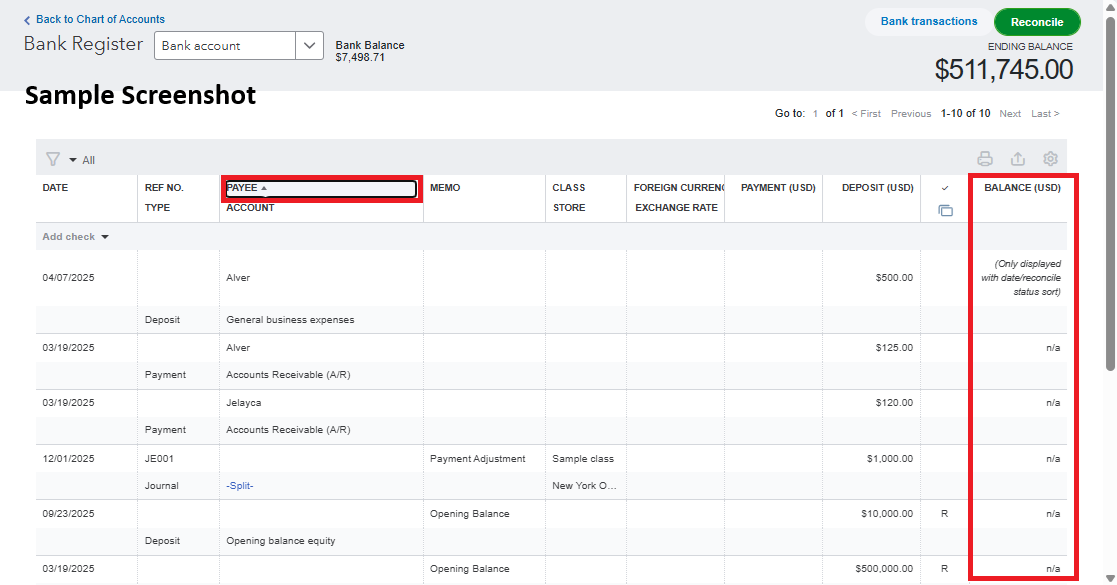
The second screenshot shows that clicking the date filter will organize the transactions chronologically and display the balance.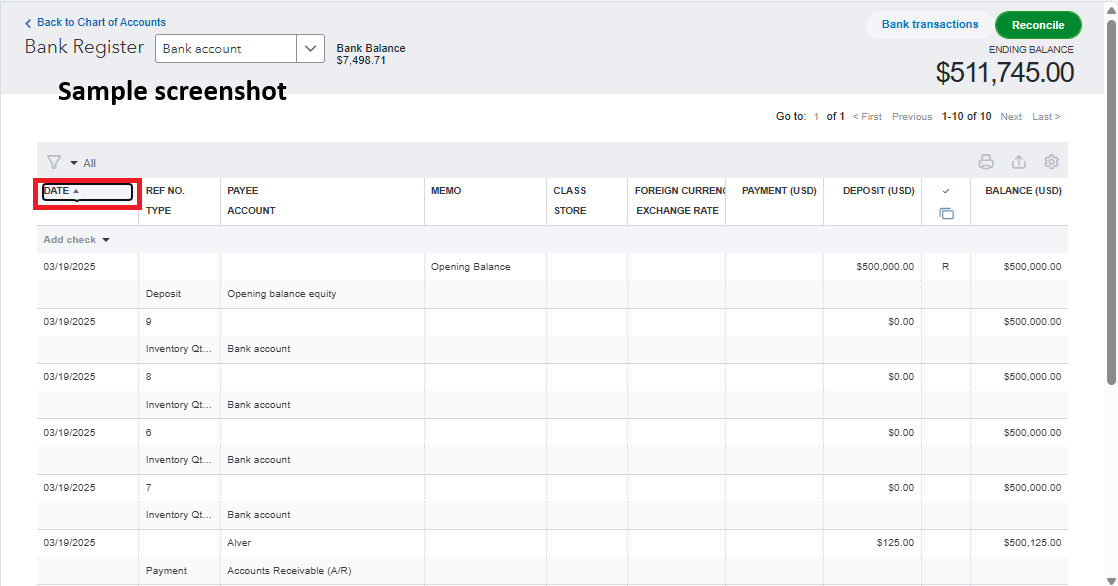
If you have other concerns related to QuickBooks, don't hesitate to reply in this thread. We're always here to help.
Hi there, SLR_Bham. I appreciate you for bringing this to our attention and for trying some troubleshooting steps to resolve the issue with the running balance not displaying. Let me assist you further and help resolve this for you.
If the balances in your Chart of Accounts are showing as N/A, this may be due to changes in the sorting filters within the account register, such as the date or header filters being accidentally adjusted.
Here's how to resolve this:
This sample screenshot demonstrates what happens when the filters are clicked or adjusted.
The second screenshot shows that clicking the date filter will organize the transactions chronologically and display the balance.
If you have other concerns related to QuickBooks, don't hesitate to reply in this thread. We're always here to help.
Lol. Of course, it was a very simple user error that should have been one I thought of, but kept choosing other options to trouble shoot. Thank you!! I am very grateful that you assisted and this resolved before I close up for the night. It's a big relief and my day will go better tomorrow as I finish up this task. Thank you thank you thank you.
Hello there, @SLR_Bham.
I am glad to hear that my colleague was able to assist you with resolving the issue of the balance not appearing in your QuickBooks Online account.
If you have any additional questions or concerns about your QuickBooks Online account, please don't hesitate to leave a comment below. We're here to help.


You have clicked a link to a site outside of the QuickBooks or ProFile Communities. By clicking "Continue", you will leave the community and be taken to that site instead.
For more information visit our Security Center or to report suspicious websites you can contact us here


