Turn on suggestions
Auto-suggest helps you quickly narrow down your search results by suggesting possible matches as you type.
Showing results for
Get 50% OFF QuickBooks for 3 months*
Buy nowHi,
I already reconciled my savings account when I realized one of my transactions should have been broken down to have different GL's and charged expenses. Now that it's reconciled, I can't go back to break it down. Any suggestions? Do I restore the reversed charge and than split out all the transactions under that lump sum charge?

Hi AESTexas,
I'll assist you in breaking down your single transaction so that the amounts are spread across different expense categories. However, You don't have to undo and split the charge because it's already reconciled, which means it shows in your bank statement as one big amount.
What you can do is Just open the transaction from the register and break the amounts into different categories. Just make sure the total amount stays the same.
To open the transaction from the bank register:
Your reconciliation report will not be affected in this process because the amount hasn't changed.
Let me know if you have more questions about correcting your reconciled transaction. Take care and have a good one!
Thank you JessT
So the $4k I'm trying to break out is multiple vendors with different categories. I think I need to delete this transaction all together instead so I input each transaction for each vendor and the appropriate category. Is this possible after the bank account has been reconciled for the month?
Hi JessT,
Unfortunately I think this won't work for me. I just tried and it's multiple payees vs. categories. I need to break out the $4k out into about 20 transactions instead. How can I delete the $4k entry after the bank account has been reconciled without affecting the reconciliation?
Thanks for getting back to us, @AESTexas.
Allow me to step in and share some details on how you can break out the $4k Journal Entry (JE) into 20 transactions in QuickBooks Online (QBO).
We can delete the created JE, recreate them, and link it to the corresponding vendors, and ensure to enter the same date. This way, it'll not affect your reconciliation.
Here's how:
Once done, you can recreate the JE and link them to the vendors. 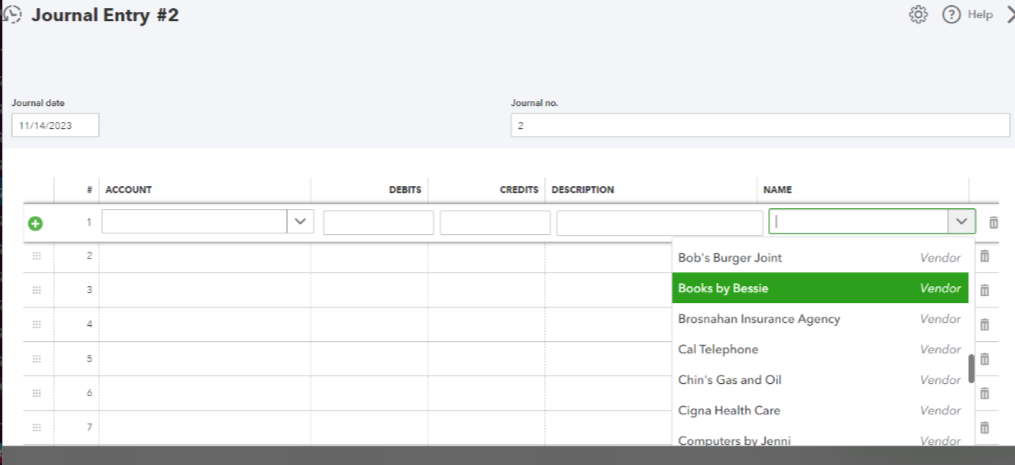
When everything is done, you'll need to manually reconcile them. You can follow the instructions I provided above and click the box until "R" appears. With this, I would encourage you to consult with your accountant to keep your financial data accurate.
I've added here an article that will help you in case you encounter reconciliation issues: Fix beginning balance issues if you've reconciled the account in the past QuickBooks Online.
Please let me know in the comment section below if there is anything else I can do to assist you with bank reconciliations. I'll always be nearby and ready to assist you, @AESTexas.


You have clicked a link to a site outside of the QuickBooks or ProFile Communities. By clicking "Continue", you will leave the community and be taken to that site instead.
For more information visit our Security Center or to report suspicious websites you can contact us here


