Turn on suggestions
Auto-suggest helps you quickly narrow down your search results by suggesting possible matches as you type.
Showing results for
Get 50% OFF QuickBooks for 3 months*
Buy now
I'd be glad to assist you today, LambertDRL.
Yes, you can. I'll show you how to connect your ELAN bank in QuickBooks Online:
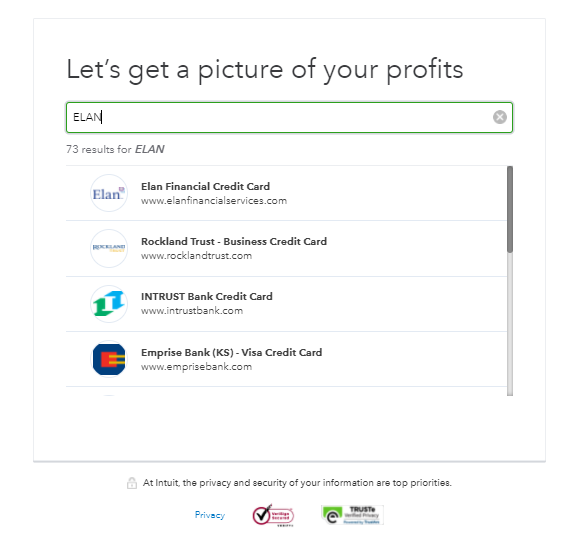
Feel free to read through this article for the detailed steps: Connect and add bank and credit card accounts to QuickBooks Online.
If you can't find your bank, here's an article that will guide you on how to handle it: Find your bank account when you connect to online banking.
Once your bank is connected, you may find this article helpful when categorizing bank transactions: Categorize and match online bank transactions in QuickBooks Online.
Of course, you're always welcome to visit us again if you need help. It will be my pleasure. Stay safe and have a great day ahead!
I'd be glad to assist you today, LambertDRL.
Yes, you can. I'll show you how to connect your ELAN bank in QuickBooks Online:
Feel free to read through this article for the detailed steps: Connect and add bank and credit card accounts to QuickBooks Online.
If you can't find your bank, here's an article that will guide you on how to handle it: Find your bank account when you connect to online banking.
Once your bank is connected, you may find this article helpful when categorizing bank transactions: Categorize and match online bank transactions in QuickBooks Online.
Of course, you're always welcome to visit us again if you need help. It will be my pleasure. Stay safe and have a great day ahead!
Thank you for this very detailed reply. I have passed your information on to our volunteer Bookkeeper who is just learning QuickBooks Online after any years on QuickBooks Desktop.
My business has two employee cards issued by Elan. Under my accounts on Elan's website the two employee cards are listed along with an "Account Payable" account. When adding to QBO do I add all three as subaccounts or just add the Accounts Payable account and not the individual employee cards. I don't know how Elan sends their transactions to QBO and want to avoid double transactions.
Hello, JMayer. Allow me to clarify things about how QuickBooks handles downloaded bank transactions.
You need to know how your bank sends the downloaded transactions before connecting to Online Banking. If all transactions download to one account, only link the parent account. Connect the subaccounts rather than the parent account if they're downloaded to separate accounts.
You may consider giving us an update once you can link your Elan accounts to QuickBooks Online.
I'm also adding these articles for additional reference and guidance:
If you have additional questions about banking, I'm always here to help you.
It looks like I will need to add the parent account only based on how Elan has set up their accounts. With only the one account connected, is there a way in QBO to categorize the transactions based on which employee made the purchase or do I have to keep the payment method the parent CC account?
Thanks!
We appreciate you returning to us, @JMayer. I will explain how downloaded transactions from your credit card are sent to QuickBooks Online.
You can't connect a parent account and its subaccounts simultaneously. If you attempt to connect both, you'll receive a message stating that the account is already connected. Hence, you can only link one of the two accounts.
Good thing we now know which account provides feeds. With only the parent account connected, your way to indicate which employee made a purchase is to use the class tracking feature. Basically, you'll add the employee names as classes and assign them to each transaction, so you can run a class report to know how much each of them has spent in a given period.
Here's a guide for more information about setting up your class list.
On the other hand, if you wish to keep track of the individual accounts, you can disconnect the parent account and manually upload transactions for every account.
In case you get any issues while uploading, see this resolution: Fix bank upload errors in QuickBooks Online.
I've also added these helpful resources for more information on how you can manage online banking transactions in QBO.
Keep in touch so we can help you further with banking or QuickBooks. Have a great rest of the week!


You have clicked a link to a site outside of the QuickBooks or ProFile Communities. By clicking "Continue", you will leave the community and be taken to that site instead.
For more information visit our Security Center or to report suspicious websites you can contact us here


