I know how important monitoring deposits is to your business, isabelathea. Let's make sure you have access to QuickBooks Checking so you can manage your income transactions accordingly.
Before we proceed, I'd like to verify if you have the necessary permission for QuickBooks Checking. Do you encounter certain errors or prompts that hinder you from accessing the account?
Please know that only administrators can open and manage it. If you have limited permission, you can contact them for assistance. Then, follow the steps below to view your deposit memos:
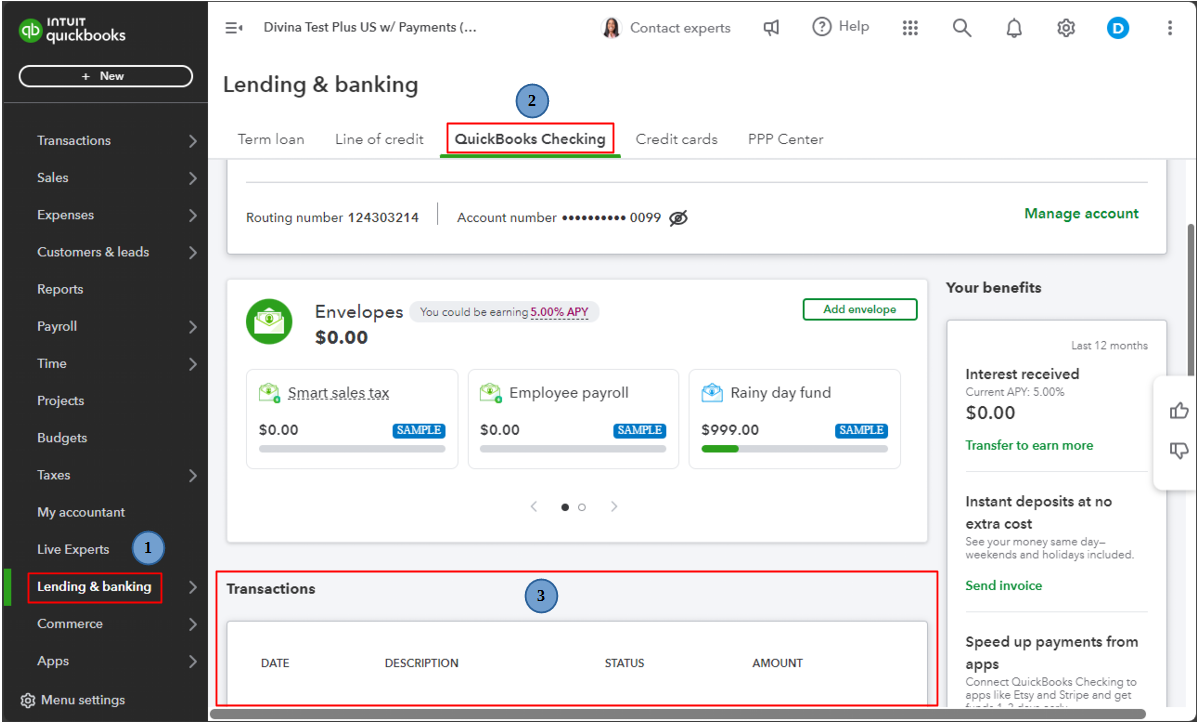
- Go to the Lending & banking menu.
- Select QuickBooks Checking.
- Go to the Transactions section to view your deposit transactions.
On the other hand, if you're an admin, you'll want to make sure you finish the account activation procedure to gain access to QuickBooks Checking.
Additionally, you may want to check out this article to answer the most commonly asked questions about QuickBooks Checking: About the QuickBooks Checking account.
Please feel free to reach out if you have any further inquiries managing deposits in QuickBooks Checking, isabelathea. I want to make sure you have all the necessary information to make the most of this feature.


