Turn on suggestions
Auto-suggest helps you quickly narrow down your search results by suggesting possible matches as you type.
Showing results for
Get 50% OFF QuickBooks for 3 months*
Buy now
I have Farmers Federal Credit Union business account and didn't pull in 3 months worth of transactions. It says it's connected to my bank and still doesn't work. I'm getting an error 103

Hi there, Kathy. The error you encountered occurs due to an incorrect username or password for the bank account you’re trying to connect to.
Since you've already verified your sign-in credentials and the financial institution appears to be connected, let's try refreshing the link between QuickBooks and Farmers Federal Credit Union by temporarily disconnecting and then reconnecting the account.
Please note that this action may reload previously downloaded transactions, which could occasionally result in duplicate entries, particularly for those already downloaded and categorized. If this occurs, you can Exclude them to manage them effectively.
To disconnect an account connected to online banking, here's how:
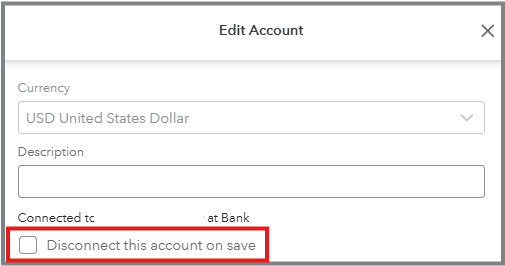
After that, please reestablish your bank's connection so QuickBooks can resume downloading transactions.
Whenever your bank transactions are already downloaded or uploaded, learn how to add and match them with those you've already entered in QuickBooks.
To enhance your experience with QuickBooks, our QuickBooks Live Expert Assisted team is available to help you manage your bank transactions.
I'm always here for you whenever you require further help. Please click the Reply button below, and I'll get back to you.
Hi there, Kathy.
Just checking in to see if the solution we shared worked for you.
Please let us know if everything is now working smoothly or if you're still experiencing any challenges.
We’ll be glad to assist further if needed.


You have clicked a link to a site outside of the QuickBooks or ProFile Communities. By clicking "Continue", you will leave the community and be taken to that site instead.
For more information visit our Security Center or to report suspicious websites you can contact us here

