Turn on suggestions
Auto-suggest helps you quickly narrow down your search results by suggesting possible matches as you type.
Showing results for
Get 50% OFF QuickBooks for 3 months*
Buy nowI applied a rule to a transaction in my banking input and it changed every transaction in expenses to that vendor and description. Now I can't get rid of the rule or fix the transactions.

Thank you for reaching out to the Community, Carol. To delete a bank rule in QuickBooks Online, go to the Bank Transactions section and select the option labeled Rules. Let me guide you through the steps.
Here's how:
Moreover, there are two possible scenarios to fix your bank transactions:
First, if the Auto-add feature is disabled for the transactions in the bank rule you created, deleting the bank rule will automatically fix the issue.

Deleting the rule will automatically remove the suggested category.
Second, if you have set up a bank rule with the Auto-add option enabled, any transactions affected by that rule will automatically transfer to the Categorized tab. Even if the bank rules are deleted, the transaction will remain in the Categorized tab. To remove it, you'll need to manually exclude the transaction.


Please refer to this article on deleting a bank rule: Set up bank rules to categorize online banking transactions in QuickBooks Online.
You can also have this article about reconciling the transactions, after resolving the concern: Reconcile an account in QuickBooks Online.
Lastly, if you need more assistance/ guidance in managing your accounts and transactions in QuickBooks Online, you can always consult our QuickBooks Live Expert Assisted.
Thank you for reaching out, Carol. If you have any further questions or need guidance while navigating the bank rules and transactions, please feel free to Reply below.
how to delete online banking transctions
how to delete online banking transactions?
Hello, @KhyleNiu11. You can delete the online transactions by excluding them from your records.
If you want to completely remove the transaction from your Excluded list, go to the Excluded tab and Delete the transactions.
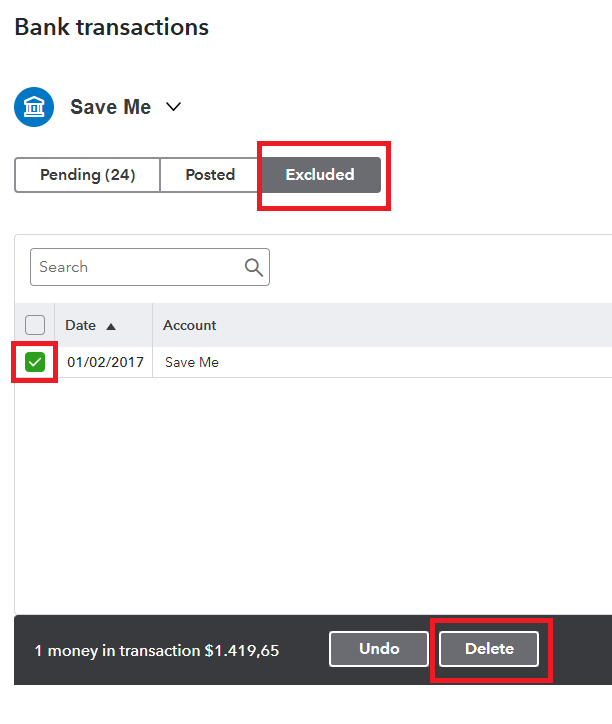
For more information, you can also check this article: Exclude a bank transaction you downloaded into QuickBooks Online.
Let us know if you have further questions. We're here to help you anytime.


You have clicked a link to a site outside of the QuickBooks or ProFile Communities. By clicking "Continue", you will leave the community and be taken to that site instead.
For more information visit our Security Center or to report suspicious websites you can contact us here


