Hello, mcmc-clthom-yaho.
I'll throw in a detailed guide on how you can enter a deposit.
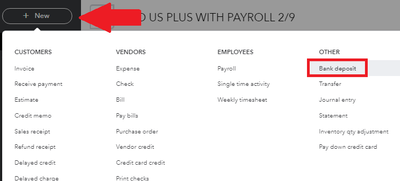
You can enter a deposit by clicking the + New menu, then selecting Bank deposit.
From there, you would want to add where you received the deposit, where you would track it, where to deposit the funds and so on.
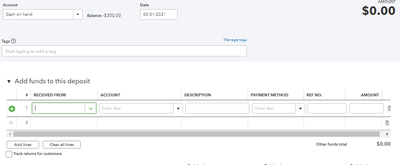
You can do a lot more with the Bank deposit function. I recommend checking this article for details: Record and make bank deposits in QuickBooks Online.
If you're referring to a retainer, the process is different. It involves creating a liability account and an invoice or sales receipt (to hold the deposit). You'll want to follow the detailed steps in this article: Record a retainer or deposit.
We also have other articles to help you record transactions such as expenses, invoices, sales receipts, and the like. Feel free to browse them in our articles list page. Scroll down at the bottom of the page to specify your topic.
I'm keeping this thread open for any other concerns you might have for QuickBooks Online. I'm here to guide you on how to record other transactions, run reports and assist you in managing your vendors or customers.


