Hello, serkanhaslak
I can help you with recording refunds in QuickBooks Online.
You can create a vendor credit for the expense to which the refunded money was applied. Then, deposit the money you've got into your bank account. After that, we can link the bank deposit and vendor's credit. I'll show you how.
Step 1: Create vendor's credit:
- Click the + New icon.
- Select Vendor credit.
- Choose the vendor's name from the Vendor dropdown.
- Fill in the necessary information.
- Enter the amount.
- Once done, hit Save and close.
Step 2: Create a Bank Deposit:
- Click the + New icon, then select Bank Deposit.
- Fill in the necessary information.
- On the Add funds to this deposit section, choose the vendor.
- On the Account column, select Accounts Payable(A/P).
- Enter the amount.
- Once done, hit Save and close.
Lastly, Create Expense transactions:
- Click the + New icon.
- Select Expense.
- Choose the vendor's name as the payee.
- Add the Bank deposit and the Vendor credit that will appear on the right side of the screen.
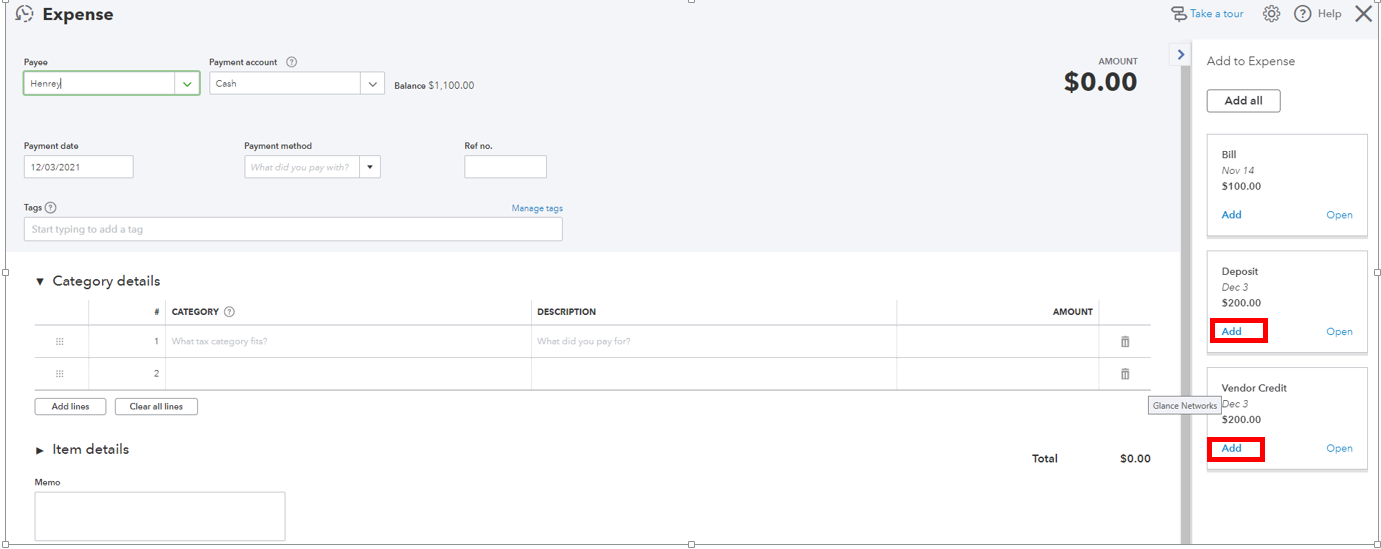
- Once done, hit Save and close.
I've got this helpful resource for more details: Handle vendor credits and refunds in QuickBooks Online.
After that, go to the Banking page and match the transactions. To guarantee that those transactions are placed in the correct accounts, check out this article for more information: Categorize and match online bank transactions in QuickBooks Online.
Let me know if you require further assistance with recording refunds or bank feeds. I'll be here to help you.


