Turn on suggestions
Auto-suggest helps you quickly narrow down your search results by suggesting possible matches as you type.
Showing results for
Get 50% OFF QuickBooks for 3 months*
Buy nowSolved! Go to Solution.

Hello there, chic316860.
I'm here to help you mark the transaction you've recreated as reconciled in QuickBooks Online (QBO).
Upon recreating a transaction, it will reappear in your register. Subsequently, you can manually reconcile it by placing R status in the Reconcile (✓) column. The process for doing this is fairly swift and straightforward.
Let me show you how:
After completing this, your starting balance should display the accurate amount. For additional assistance on manually reconciling bank transactions and removing their reconciled status, you can consult this article: Undo or remove transactions from reconciliations in QuickBooks Online.
Once done, you can now proceed with the reconciliation process. Refer to this article for future reference: Reconcile an account in QuickBooks Online.
Please leave a comment below if you have additional questions about reconciliation or anything else, chic316860. I'll be here to assist. Keep safe.
Hello there, chic316860.
I'm here to help you mark the transaction you've recreated as reconciled in QuickBooks Online (QBO).
Upon recreating a transaction, it will reappear in your register. Subsequently, you can manually reconcile it by placing R status in the Reconcile (✓) column. The process for doing this is fairly swift and straightforward.
Let me show you how:
After completing this, your starting balance should display the accurate amount. For additional assistance on manually reconciling bank transactions and removing their reconciled status, you can consult this article: Undo or remove transactions from reconciliations in QuickBooks Online.
Once done, you can now proceed with the reconciliation process. Refer to this article for future reference: Reconcile an account in QuickBooks Online.
Please leave a comment below if you have additional questions about reconciliation or anything else, chic316860. I'll be here to assist. Keep safe.
thank you. i was able to get the transaction to 'R' (reconciled) status. once i did that i no longer had a beginning balance error and was able to reconcile current month's bank statement. all is good now!
again thanks!
Appreciate the update, @chic316860.
We're glad to hear that the steps provided by my colleague have helped with your issue. And thank you for sharing. We want to ensure our users are on top of their business.
You may visit our Help Articles page to read different information that will guide you in future tasks.
I'll be one message away if you need anything else. I wish you a prosperous rest of the year! Have a great day, and keep safe!
Help! I am having the same problem, but when I get to my register and click on the box in the reconcile column for me new recreated transaction, I get a message that I cannot edit that column. When I try to edit the transaction, there is no reconcile column to edit. What can I do?
I appreciate your effort in marking the transaction as reconciled, RRUSTreasurer. I understand the importance of having an accurate and balanced record.
To better understand what's causing this issue, could you let us know the exact message you're seeing when clicking on the box in the Reconcile (✓) column?
Manually changing the reconciliation status can be completed within the Bank Register, which is why the Reconcile (✓) column doesn't appear when you try to edit the transaction.
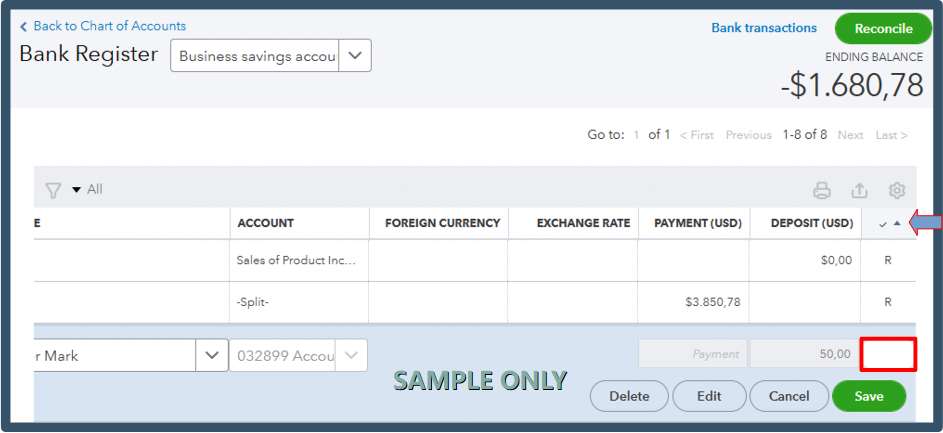
Since you're unable to edit the status, I recommend logging out of your account and then logging back in to refresh the system.
Once you've accessed the system, manually mark the transaction as reconciled again.
Please don't hesitate to add a comment below if you have further questions. We're always here to help.
That’s exactly why I built ReconcileBook it helps you clean up and reconcile faster without fighting QuickBooks.
You can upload pdf or csv bank statements, flag duplicates, and match transactions automatically before they ever touch QuickBooks.
Once everything looks right, just export straight to QuickBooks or Excel so your books stay clean and balanced.
It’s been super helpful for cleanup jobs and catching errors that QBO misses.


You have clicked a link to a site outside of the QuickBooks or ProFile Communities. By clicking "Continue", you will leave the community and be taken to that site instead.
For more information visit our Security Center or to report suspicious websites you can contact us here


