Turn on suggestions
Auto-suggest helps you quickly narrow down your search results by suggesting possible matches as you type.
Showing results for
Get 50% OFF QuickBooks for 3 months*
Buy nowI have 194 transactions to manually enter.. Please help

Hi info2349, it seems the current file format is causing an error during the import process. Let me guide you on adjusting the CSV format so your transactions upload successfully.
Before we proceed, we can refresh the bank's connection first to pull your most recent transactions. Here's how:
If refreshing doesn't download the transactions, you can manually import the file.
While a sample CSV file is currently unavailable for download in QuickBooks, you can request or download it directly from your bank's website. If this format isn't an available option, you can also use a QBO, QFX, or OFX file to import your transactions.
To create a CSV file, you can follow either three (3) columns or four (4) columns format.
The three-column format includes Date, Description, and Amount as the column headers. Please see the image below for reference: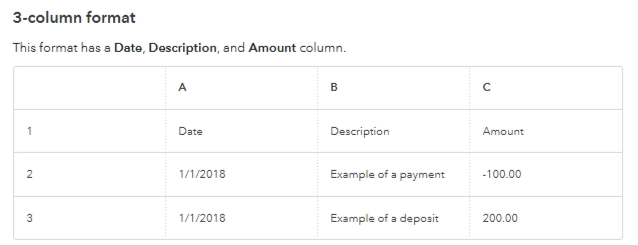
The four-column format includes Date, Description, Credit, and Debit as column headers, shown in the image below: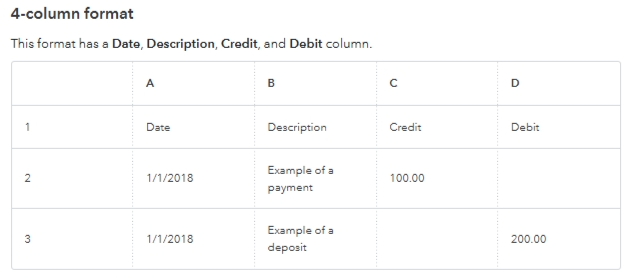
If you still encounter an error while uploading the file, please refer to the Format your CSV file section in this article to resolve it: Format CSV files in Excel to get bank transactions into QuickBooks.
Please don't hesitate to reach out if you require further assistance.
What file can you download from your bank? csv, pdf or else?
Hello, info2349.
I’m following up to see if the solution we provided worked for you.
Did it resolve the issue, or are you still experiencing difficulties?
We're happy to assist further if you need any more help.


You have clicked a link to a site outside of the QuickBooks or ProFile Communities. By clicking "Continue", you will leave the community and be taken to that site instead.
For more information visit our Security Center or to report suspicious websites you can contact us here


