Turn on suggestions
Auto-suggest helps you quickly narrow down your search results by suggesting possible matches as you type.
Showing results for
Get 50% OFF QuickBooks for 3 months*
Buy nowA payment on a invoice is being matched, which that part is correct. However, there was a $10 bank transfer fee that was taken out so QB is asking to split the transaction and categorize the fee. So I choose Bank Charges as the category, click Match, and then I get a message that says "Somethings not quite right". I've never had this issue until they began implementing their AI software. Does anyone have a work around?
I reached out to Quickbooks technical support, and immediately they're trying to sign me up for the $59.95 Live Help.
I have a screen recording but its too large to attach here.

Hi there, @james211. Let me provide additional details to help you troubleshoot the error you're receiving when recording invoice payments.
The error "something's not quite right" usually occurs if the data in your browser is outdated, which needs to be cleared. To isolate this issue, try using a new incognito window or any other supported web browser to ensure you're logging in to the updated interface.
If the issue persists, this error might be coming from the matching process. If you matched the transaction with the invoice before adding the fee category, it will cause an error. QuickBooks Online needs everything to reconcile properly before it can match things up.
To fix this, you'll need to unmatch the invoice entry with the transaction and change the process by adding the bank fee during the matching process. Here's how:
1. Go to Bank transactions, then choose the bank account.
2. Click Posted, then hit Undo.
3. Once the transaction is already in the Pending tab, select Match.
4. Choose the invoice you want to match.
5. Hit the If needed, resolve the difference arrow.
6. Choose the correct category for the bank fee and enter the amount $10.
7. Once done, click Match.
Alternatively, when recording invoice payments, especially those with bank transfer fees, I recommend using the "Undeposited Funds" or "Payments to deposit" account to record the payment, then creating a bank deposit that will match the bank transaction in your bank feed. This will help you accurately track the full amount of the invoice payment, including any associated fees, before depositing the funds into your bank account.
Here's how to create a bank deposit to include the bank fee:
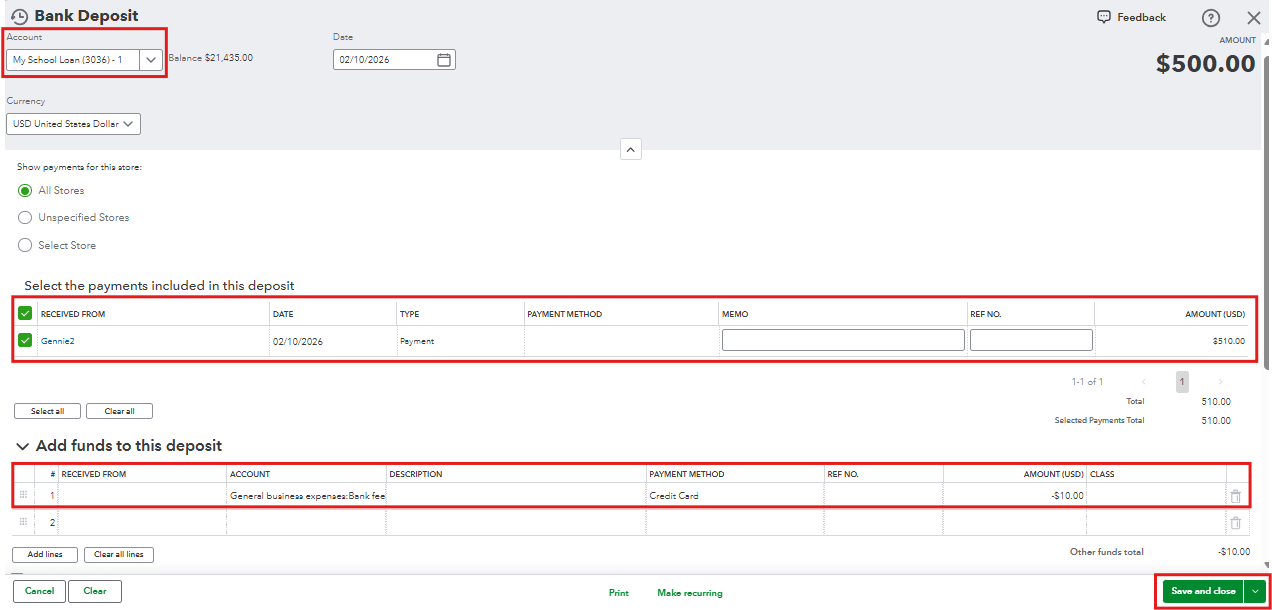
Please note that when assigning fees, you can select an expense account. However, it would be best to consult with your accountant to ensure the fee is tracked accurately.
After that, you can now match the deposit to the transaction in your bank feed with the bank transfer fee.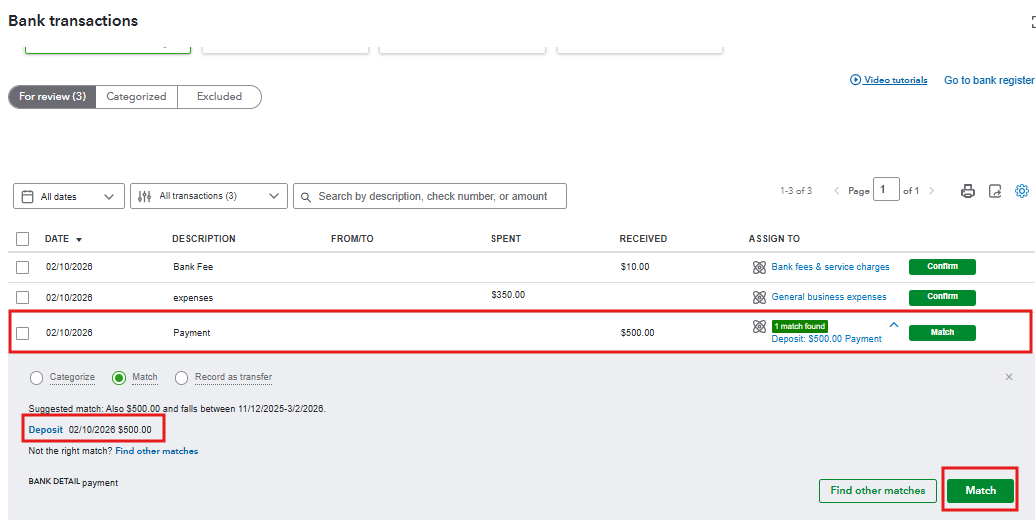
Please post in the Community forum again for any other questions, and we'll respond promptly.
Hello, james211.
I’m following up to see if the solution we provided worked for you.
Did it resolve the issue, or are you still experiencing difficulties?
We're happy to assist further if you need any more help.
I have the same problem trying to match an Account Receivable deposit with an Accounts payable expense intuit processing fee in my bank transaction. I tried to resolve it but it adds an additional amount.
please help!!!
I have another issue matching a 11,500.00 deposit and a shortage of 100.00 deposit to a $11,000.00 and a $600.00 check payment.
Hi there, @GWShawzes. You're on the right track with matching your transactions. Instead of entering a positive amount for the difference, make it a negative difference amount, as this will offset the amount and match the transaction.
Select the payee that took out the fee, then choose bank fees and service charges in the Category field, and enter the negative difference amount. That will zero out the difference and allows it to be matched.
Once it's matched, you'll be able to see in the Posted section that there are multiple transactions indicated in the matched transaction. When you click it, one of those will show an expense recorded as the bank service fee.
Regarding your second issue, are you referring to a fee as well? If so, you can follow the same process mentioned above. But if it's not a fee, you can still follow the same process, though when it comes to selecting the category, it's best to reach out to your accountant for guidance.
If you have questions, feel free to reply. We’re here to help.
Thank you for your response. I will try that and let you know on the results.
Hello,
I did as you suggested and it did the match.
The other issue was a deposit correction. I did post as suggested again and changed the category to Bank Adjustment/ Correction, other income, other misc income.
I'm glad I found this and I thank you again.
Have a wonderful weekend!


You have clicked a link to a site outside of the QuickBooks or ProFile Communities. By clicking "Continue", you will leave the community and be taken to that site instead.
For more information visit our Security Center or to report suspicious websites you can contact us here


