Thank you for reaching out and providing detailed information about your issue with PayPal, @jsanders84.
Refreshing your browser allows duplication of transactions on your PayPal account. Which is why every time you check the For the page review, a lot of transactions are repeated on every page.
For your duplicated transactions, we can batch exclude them and delete them later.
At the moment, this is the easiest way to remove duplicated transactions.
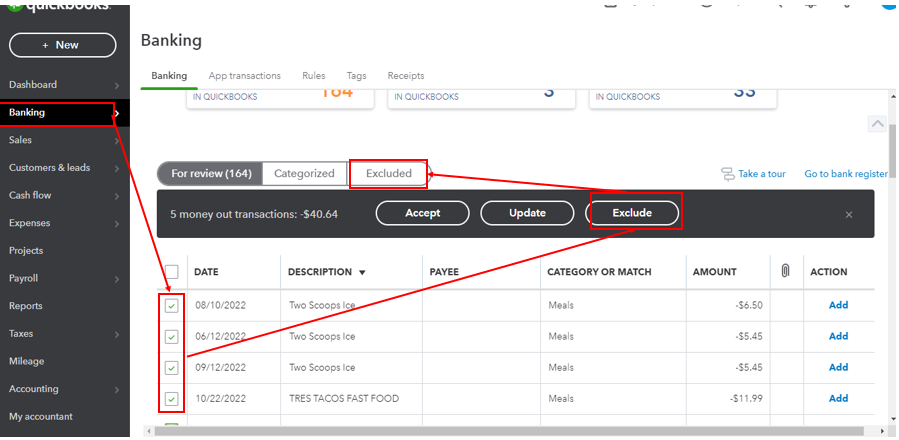
Here's how to batch Exclude transactions:
1. Go to Banking.
2. Tick the box for the transactions you want to exclude.
3. Select Exclude.
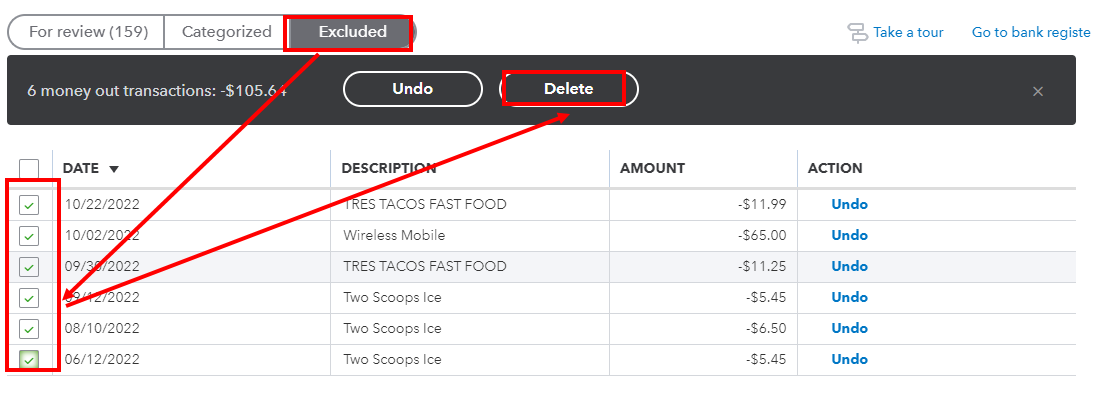
To Delete the excluded transactions here's how:
1. In the Banking section, click Excluded.
2. Tick the box beside the transaction you want to delete.
3. Click "Delete".
Note: Deleted transactions will no longer be retrievable.
If you want to learn where to put your downloaded bank transactions, you can read through this article: Categorize and match online bank transactions in QuickBooks Online.
Stay in touch if you have further questions with duplicated transactions. I'll be willing to help you. Have a great day!


