Get 50% OFF QuickBooks for 3 months*

Buy now
cancel
Showing results for 
Search instead for 
Did you mean: 
Announcements
Simplify payday and set payroll to run automatically on QuickBooks. Explore QuickBooks Payroll
jsanders84
Level 1

PayPal problems - For Review page bug and duplicate transactions

Hi,


I am trying to link my PayPal account, but I am running into multiple problems.


First the transaction count (big number in the box) differs from the total transactions shown in the For Review pages. The box shows 350 transactions while the For Review page links says 1-50 of 614. When I go to page two it says 51-100 of 614, but it still shows the first 50 transactions. Additionally, if I categorize any of the transactions to clear them out of this page, the new ones that are loaded at the bottom are clones of the last one. This makes it so when I categorize, I sometimes end up getting an error stating that the transaction was already added, and have to refresh my browser to get new transactions to populate the list.


The other problem I have is duplicate transactions, a lot of them, for items bought with a credit card through PayPal. I have read that I am supposed to be able to exclude them, but there are a lot, and I was hoping there might be a simpler way. I wish I could apply Rules to PayPal, but alas. Any advice would be welcome.


Thanks for any assistance!

1 Comment 1
Bryan_M
QuickBooks Team

PayPal problems - For Review page bug and duplicate transactions

Thank you for reaching out and providing detailed information about your issue with PayPal, @jsanders84.
 

Refreshing your browser allows duplication of transactions on your PayPal account. Which is why every time you check the For the page review, a lot of transactions are repeated on every page.

For your duplicated transactions, we can batch exclude them and delete them later. 
At the moment, this is the easiest way to remove duplicated transactions.
 

Here's how to batch Exclude transactions:

1. Go to Banking.
2. Tick the box for the transactions you want to exclude.

3. Select Exclude.
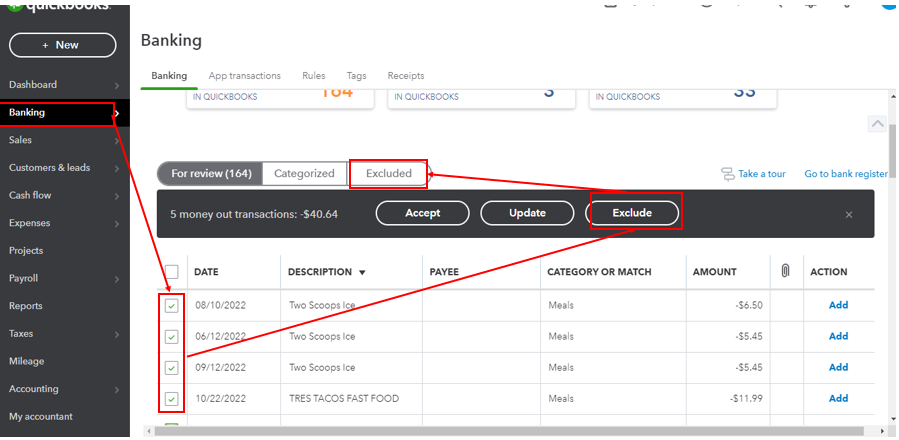


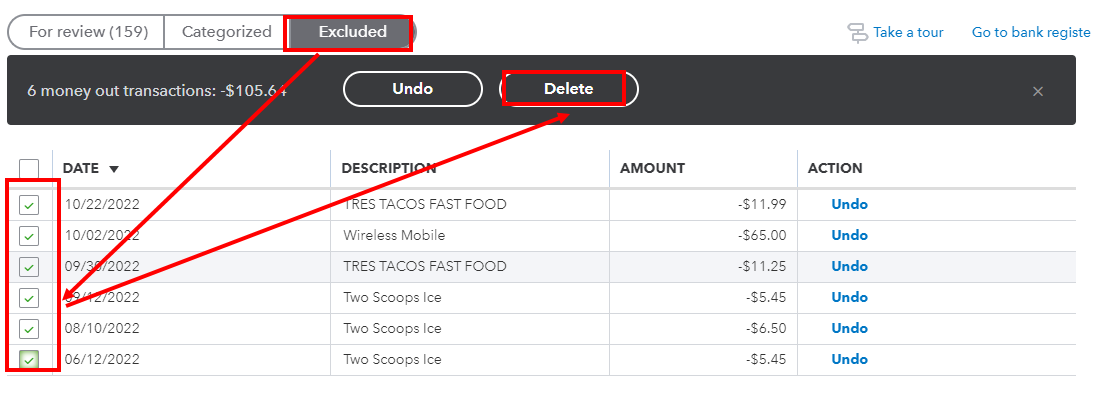
To Delete the excluded transactions here's how:


1. In the Banking section, click Excluded.
2. Tick the box beside the transaction you want to delete.
3. Click "Delete".

Note: Deleted transactions will no longer be retrievable.
 

If you want to learn where to put your downloaded bank transactions, you can read through this article: Categorize and match online bank transactions in QuickBooks Online
 

Stay in touch if you have further questions with duplicated transactions. I'll be willing to help you. Have a great day!

Need QuickBooks guidance?
Log in to access expert advice and community support instantly.

Need to get in touch?

Contact us