I'll show you how to filter your bank transactions in QuickBooks Online (QBO) according to date, @PQ1.
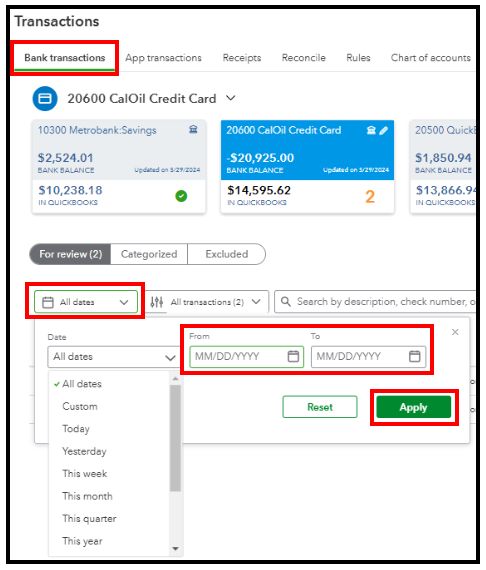
To streamline the search process of your bank transactions, you can utilize the filter section on the Transactions page. Here's how:
- Go to Transactions and select Bank Transactions.
- Click the For Review page.
- Select the All Dates dropdown and enter the range in the From and To fields.
- Click Apply.
Moreover, reconcile your accounts in QBO to ensure they correspond to your bank statements.
Furthermore, QuickBooks Live Assisted can be a great avenue for one-on-one assistance and peace of mind when handling bank transactions.
Please keep the conversation going if you have other questions concerning bank transactions. We'll be happy to lend you an extra hand.


