Turn on suggestions
Auto-suggest helps you quickly narrow down your search results by suggesting possible matches as you type.
Showing results for
Get 50% OFF QuickBooks for 3 months*
Buy nowI am manually importing a bank statement into QuickBooks in order to be matched to invoices or deposits, my question is when I delete a deposit and the customer payment, if I reupload it says no new transactions available in my transaction list. How am I able to re upload this transaction once again into QuickBooks so it can be used?
Solved! Go to Solution.
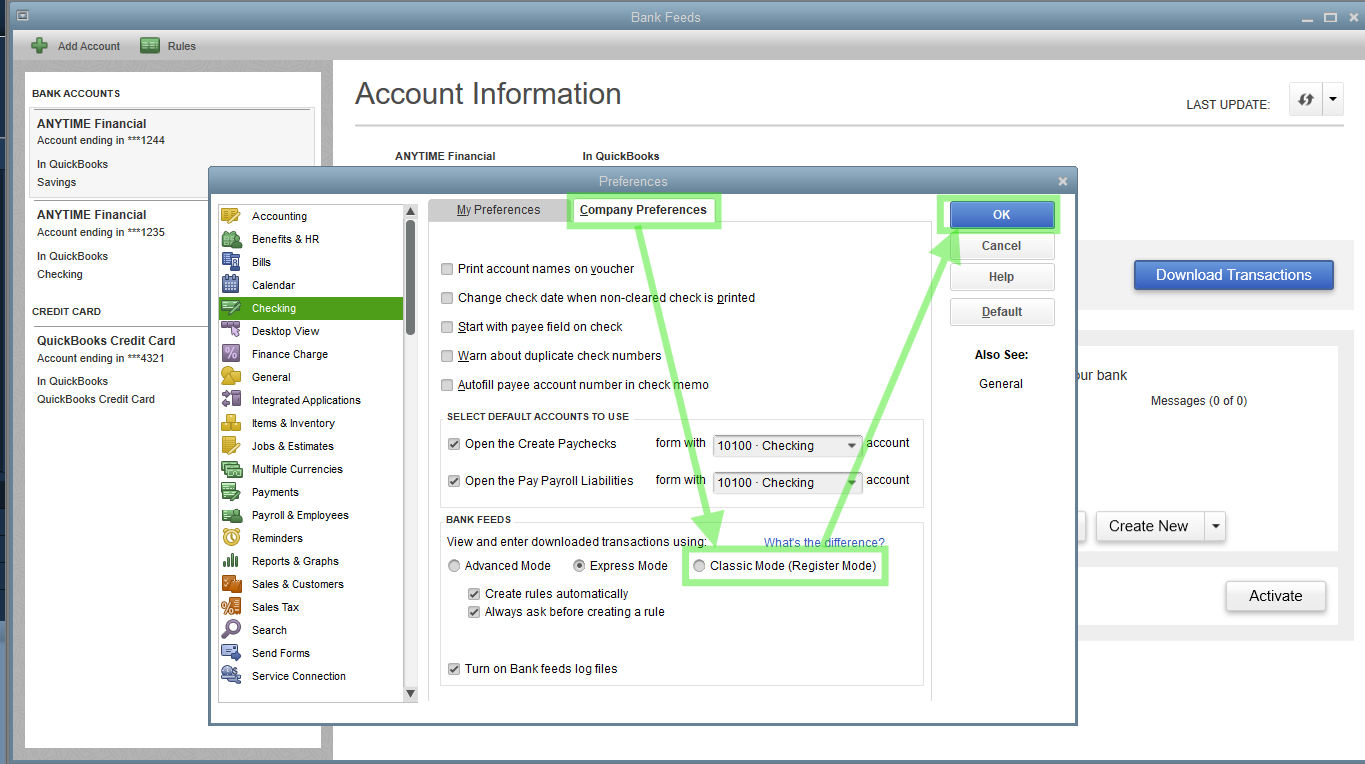
The 'No new transactions available' message appears because the entry recently imported was deleted and the system recognized it, @KG1515. To reupload this transaction, I suggest switching your Bank Feeds to Classic Mode.
Here's how:

Once done, reupload the file. If the issue persists, please follow Step 4 via this article to rectify it promptly: Fix Web Connect import errors.
Feel free to comment if you need more help.
The 'No new transactions available' message appears because the entry recently imported was deleted and the system recognized it, @KG1515. To reupload this transaction, I suggest switching your Bank Feeds to Classic Mode.
Here's how:

Once done, reupload the file. If the issue persists, please follow Step 4 via this article to rectify it promptly: Fix Web Connect import errors.
Feel free to comment if you need more help.
You have clicked a link to a site outside of the QuickBooks or ProFile Communities. By clicking "Continue", you will leave the community and be taken to that site instead.
For more information visit our Security Center or to report suspicious websites you can contact us here