Hey there, @mojossweetsnow. The sudden shift from Sync with Square App to Square Connector App might have triggered some errors in your categorized transactions over the past two years.
On top of that, QuickBooks is dependent on the data shared by the Square App. We can, however, try to locate those transactions to confirm whether they're missing or not by filtering out the Pending section correctly.
Here's show:
- From the Accounting tab, choose Integration transactions.
- Locate the Square Connector and go to the Posted tab.
- Filter the Date field and Apply. Then, select the type of transaction you want to fine.
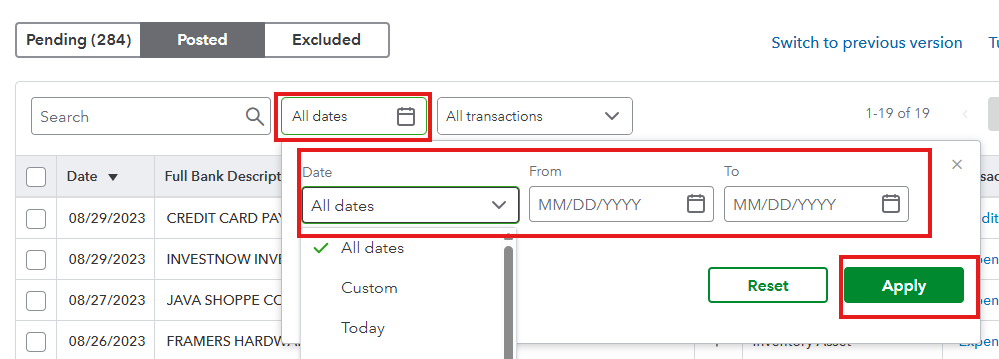
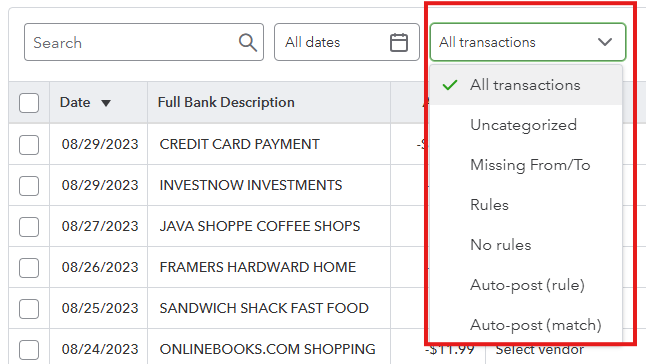
If this doesn't show them, let's check your Audit log to see if someone made changes in your account, specifically to your categorized transactions in Square. If not, let us refresh your browser, clear the cache, and Intuit-specific cookies to determine if this is just a browser-related issue that needs a trigger to accurately sync changes.
If the issue persists, I recommend contacting the Square App support team to see if the changes they made to their systems affect the categorized transactions from their previous application in QuickBooks, so you will know what steps to take to retrieve them.
Don't hesitate to return here if you have additional questions about the integration of the Square Connector App and QuickBooks.


