I appreciate the uniqueness of your former bookkeeper's method for factored invoices, Bondirl. Let’s work together to establish a streamlined and effective process that aligns with your current accounting requirements.
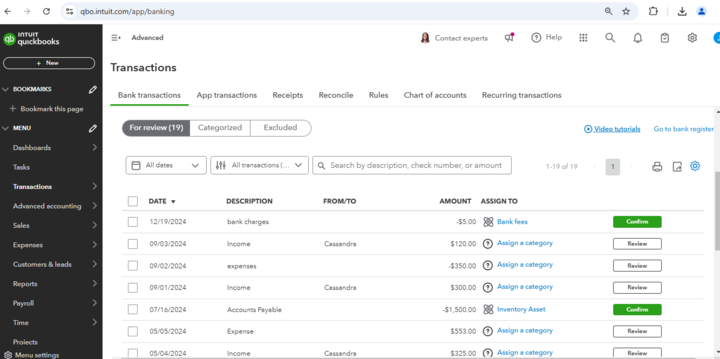
The reason you cannot see the $5 factoring fee expense when trying to match it to the bank deposit is that the factoring fee is categorized as an expense rather than a bank transaction. When you receive a payment from the factoring company, it is only reflected in your bank account, while the expense for factoring fees is recorded separately in your expense accounts.
To match the deposit and the associated expense, I recommend creating a journal entry to transfer the $5 factoring fee to the bank account and match it once downloaded from your bank.
Before creating a journal entry, I suggest consulting with a professional accountant to assist you with the appropriate debits and credits to use in this process.
To create a Journal Entry, follow these steps:
- Navigate to the + New button from the left navigation panel.
- Select Journal Entry under the Other section.
- On the first line, select an account from the Account field. Depending on whether you need to debit or credit the account, enter the amount in the correct column.
- On the next line, select the other account you’re moving money to or from.
- Enter information in the memo section to know why you made the journal entry.
- Select Save and Close.
Once completed, the $5 will be recorded and reflected in your bank transactions, allowing you to start matching it effectively.
Additionally, I’ll share this valuable resource that will guide you in creating standardized invoice templates, including factoring fees. This will simplify your invoicing process for future transactions, helping you save time and reduce errors effectively: Customize invoices and other Sales entries in QBO.
To enhance your experience and streamline your financial management, I highly encourage you to explore QuickBooks Live Expert Assisted. This invaluable service connects you with QuickBooks-certified experts who can provide personalized guidance tailored specifically to your needs. Whether you're looking for assistance with managing factored invoices or optimizing your bookkeeping practices, these experts are equipped to help you navigate these challenges effectively and efficiently.
We truly value your participation in our Community and appreciate your willingness to seek guidance. Remember, this forum is here for you to leverage collective knowledge and experiences with our program. Please revisit this thread with any questions or updates. We're excited to hear about your progress and eager to assist you as you navigate these changes.


