Turn on suggestions
Auto-suggest helps you quickly narrow down your search results by suggesting possible matches as you type.
Showing results for
Get 50% OFF QuickBooks for 3 months*
Buy nowHi, i entered wrong starting dates for my bank account and both credit cards. How can I edit this start date?
Solved! Go to Solution.

Welcome to the Community space, @tasdemir. It's my pleasure to help you change the starting date to keep your financial records accurate.
We can disconnect your accounts and then reconnect them again to select the correct starting date. Here’s how to disconnect an account from online banking:
After this, you can reconnect the account to start downloading transactions again. QuickBooks automatically downloads and categorizes your transactions to save time when updating your bank feeds. All you have to do is to review and approve them.
However, if reconnecting the account isn't your preferred option, you can exclude any irrelevant transactions or manually upload the necessary transactions to adjust the start date accordingly.
On the other hand, if you're referring to the bank register and need to modify the start date of your opening balance, you can manually edit it without the need to disconnect and reconnect the account. This flexibility allows you to manage your financial records effectively and ensure accuracy in your bank account information.
If you have any more questions or require further guidance, don't hesitate to reach out.
Welcome to the Community space, @tasdemir. It's my pleasure to help you change the starting date to keep your financial records accurate.
We can disconnect your accounts and then reconnect them again to select the correct starting date. Here’s how to disconnect an account from online banking:
After this, you can reconnect the account to start downloading transactions again. QuickBooks automatically downloads and categorizes your transactions to save time when updating your bank feeds. All you have to do is to review and approve them.
However, if reconnecting the account isn't your preferred option, you can exclude any irrelevant transactions or manually upload the necessary transactions to adjust the start date accordingly.
On the other hand, if you're referring to the bank register and need to modify the start date of your opening balance, you can manually edit it without the need to disconnect and reconnect the account. This flexibility allows you to manage your financial records effectively and ensure accuracy in your bank account information.
If you have any more questions or require further guidance, don't hesitate to reach out.
Thanks for the quick response. That's very kind of you.
Hello! I have tried to fix my error from entering 1-1-2025 to a start date of 1-1-2024. When I remove the link, change the date to 1-1-2024, save it, and go back into it, the account is still only bringing up dates in my register from 1-1-2025. Can you help?
Some banks have specific limitations on pulling transactions when connecting banks, Julie. I’d like to share some insights that can help you retrieve those transactions effectively.
When you connect an account for online banking, QuickBooks automatically downloads transactions from the past 90 days or fewer. Unfortunately, this default process cannot be adjusted, meaning you won’t be able to select a custom start date to download 2024 transactions.
However, you can access and upload transaction data manually from your bank. For this, refer to your bank statements and upload transactions on a month-by-month basis using the following steps:
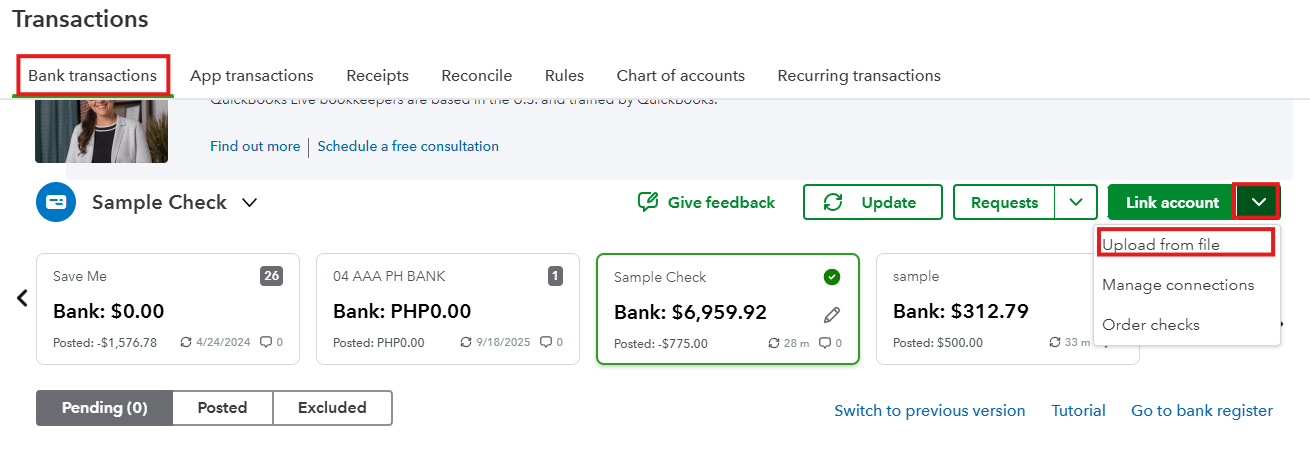
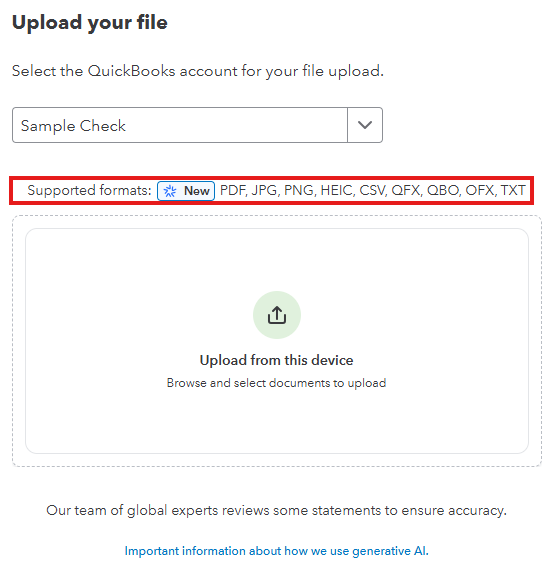
For further guidance, visit this resource: Manually upload transactions into QuickBooks Online.
If you need anything else or have questions about managing transactions in QuickBooks Online. You can drop a comment below. I'm here to lend a hand.


You have clicked a link to a site outside of the QuickBooks or ProFile Communities. By clicking "Continue", you will leave the community and be taken to that site instead.
For more information visit our Security Center or to report suspicious websites you can contact us here


