Hello, imfree2416-yahoo.
I have some ideas on how you can bring the missing cleared checks to the reconciliation page.
If they aren't in QuickBooks Online yet, they won't show up on the reconciliation page. If you're using the Online Banking feature, you'll want to ensure they are added to your books. Here's how:
- Go to the Banking page.
- Under the For review tab, find and locate the cleared checks.
- Categorize them, then click the Add button.
Also, make sure that those cleared checks are recorded under the correct bank account. If not, you'll want to delete and recreate them (provided that they're already recorded in QuickBooks but under the wrong bank account). Here's how:
- Go to the Chart of Accounts.
- Find the wrong bank account, then click on View register.
- Locate and select the checks.
- Click the Delete button.
Recreate them by clicking the + New icon, then selecting Check. Select the correct bank account under the Bank Account drop-down menu.
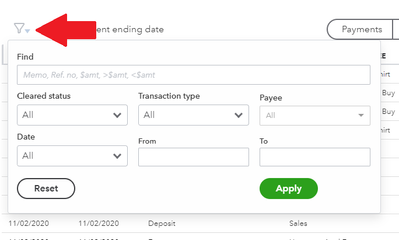
If they are already added but they still won't show on the reconciliation page, you'll want to check your filters. Simply click the Filter menu, then adjust your filter settings. Proceed with Apply afterwards.
If you need more help with the reconciliation process, feel free to check this article for reference: Reconcile an account in QuickBooks Online.
You can always visit our general articles list page if you need help with other tasks in QuickBooks Online. The guides there can help you run reports, manage lists and more.
Do you need to take care of other reconciliation-related tasks? Please let me know and I'll ensure your transactions are sorted out accordingly. If you have other questions, ask away and I'll get back to you.


