Hi there, Lykins. QuickBooks has several types of fees depending on the plan or service you’re using. Visit our Plans & Pricing page to view our offers.
If your concern is about the subscription cost for QuickBooks Online, you can take advantage of the free 30-day trial to explore its features without any upfront charges.
Here's how you can access the free trial:
- Visit the official QuickBooks website: Navigate to the QuickBooks Free Trial page.
- Choose a plan: Select one of the available plans (Simple Start, Essentials, Plus, or Advanced) that includes a 30-day free trial.
- Skip add-ons: If payroll services are not essential for your business, you can opt to proceed without adding them.
- Complete the registration: Provide the required information, such as your email address, and follow the prompts to finish setting up your account.
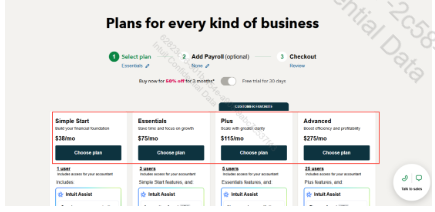
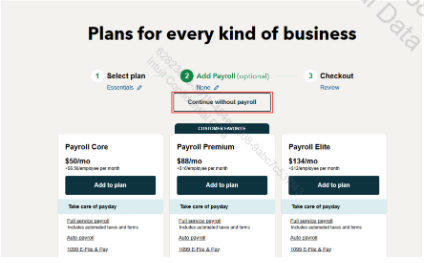
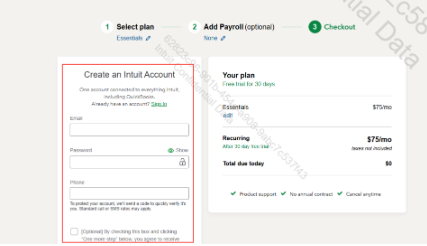
Once your account is set up, you’ll have instant access to QuickBooks Online.
Please note that you may need to provide payment details during registration, but you won’t be charged during the trial. To avoid automatic charges, cancel your subscription before the trial ends if you don’t want to continue using the software.
On the other hand, are you asking about transaction fees related to QuickBooks Payments or fees associated with add-on services like Payroll or QuickBooks Time? These costs are separate and depend on which features or integrations you’re using with QuickBooks.
For a helpful start, here’s an article with QuickBooks Online how-to videos: Learn about QuickBooks Online with how-to videos.
If you have any additional concerns regarding QuickBooks, please reach out to us again. We’re always happy help.


