Get 50% OFF QuickBooks for 3 months*

Buy now
cancel
Showing results for 
Search instead for 
Did you mean: 
Announcements
Simplify payday and set payroll to run automatically on QuickBooks. Explore QuickBooks Payroll
brikerjb-bellsou
Level 1

I had newest version of QB installed today but it doesn't look like he imported any info from old version to newest version can you help me?

can you help me import info from one QB to the new version?
2 Comments 2
Fiat Lux - ASIA
Level 15

I had newest version of QB installed today but it doesn't look like he imported any info from old version to newest version can you help me?

Are you using QB Online or QB Desktop?

LieraMarie_A
QuickBooks Team

I had newest version of QB installed today but it doesn't look like he imported any info from old version to newest version can you help me?

Thanks for upgrading, @brikerjb-bellsou


I'm here to help you load your company file on your newest version.


To clarify, are you using QuickBooks Desktop (QBDT) or QuickBooks Online (QBO)? If you're using QBDT, follow these steps to restore your file: 


  1. Open QuickBooks.
  2. Go to the File menu and select Open or Restore Company.
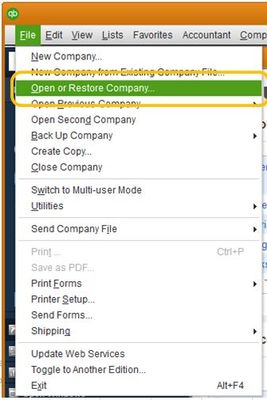
    Capture.JPG
  3. Restore the file based on its type:


If you forgot where you saved your file, a copy is always available in your Downloads folder. To check, refer to this article: Restore Your File.


Feel free to come back if you need further assistance with getting your file imported. The Community is always here to lend a hand.

Need QuickBooks guidance?
Log in to access expert advice and community support instantly.

Need to get in touch?

Contact us
