Turn on suggestions
Auto-suggest helps you quickly narrow down your search results by suggesting possible matches as you type.
Showing results for
Get 50% OFF QuickBooks for 3 months*
Buy now
Welcome to the Community, @Yavin.
Before we dig deeper into your concern, we'd like to thank you for allowing us to assist you with your current situation inside QuickBooks Self-Employed (QBSE). You can manually track and utilize the Filters to locate specific transactions for your entries. We'll write down the steps to get you going:
You can also refer to your bank statement to ensure you're tracking the correct transactions you have for your entries inside the program.
For visual reference, see the screenshot that we've attached.
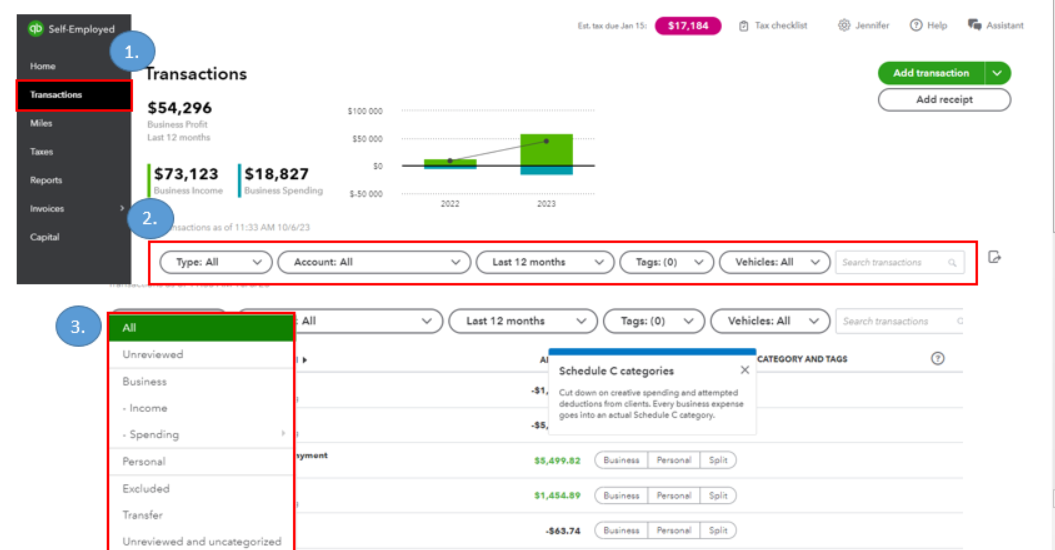
In addition, here are some handy articles to make it easy for to add transactions, and track them inside the program:
It's been a pleasure to have you here today, @Yavin. We're open 24/7 if you have additional questions or concerns about the program. Feel free to visit us anytime or comment below so we can get back to you right away. Stay safe, and have a good one!
Thanks, but this doesn't really answer the question asked. I have tags on most of my transactions but would like to filter for onlty transactions with NO tags. I understand I can export and create a filter in excel to find them but I would like to do this directly in quickbooks self-employed portal. Is there any filter syntax which would only display transactions with NO tags on them.
I appreciate your prompt response and additional information, Yavin. It helps us clarify the specific option you want.
Currently, there is no direct option available in QuickBooks Self-Employed (QBSE) to filter transactions that do not have tags assigned to them. Let's forward your valuable Feedback to our product engineers. They will evaluate your idea. Here's how:
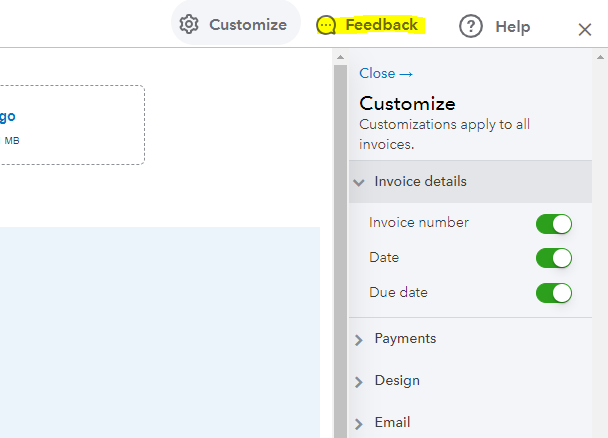
In the meantime, you can continue to export your transactions to Excel and manually filter your data.
As always, you can share your thoughts in this thread. We'll be around to help whenever you need. Bye for now, and thanks for considering Community to assist and providing necessary details.


You have clicked a link to a site outside of the QuickBooks or ProFile Communities. By clicking "Continue", you will leave the community and be taken to that site instead.
For more information visit our Security Center or to report suspicious websites you can contact us here


