Turn on suggestions
Auto-suggest helps you quickly narrow down your search results by suggesting possible matches as you type.
Showing results for
Get 50% OFF QuickBooks for 3 months*
Buy nowWhen matching transactions to existing invoices, if the invoice is found and added to Quick Books it goes directly to Undeposited Funds, when making a line manually or a deposit list the undeposited funds section is not available to be selected. I need this to go to undeposited funds to then be organized somewhere else. Does anyone have a solution for this?

Thanks for reaching out to the QuickBooks Community, @KG1515.
How are you doing today? I hope all is well.
If you don't mind my asking, when you say "when making a line manually or a deposit list the undeposited funds section is not available to be selected", are you meaning you're creating a new deposit slip to combine the payments you do not see the payments that are in the undeposited account? Or do you mean when you manually record a payment, the option to deposit to the undeposited funds account isn't available?
The more information you can provide, the better we can assist you with the right steps. If possible, please share a screenshot of what you're seeing. This way, we can have a good visual of the issue.
In the meantime, here are a couple of help articles that provide more information about the undeposited funds account:
I'll be sure to keep an eye out for your reply. Please let me know if you have any additional questions or concerns. Chat with you soon!
Thanks for reaching out to the QuickBooks Community, @KG1515.
How are you doing today? I hope all is well.
If you don't mind my asking, when you say "when making a line manually or a deposit list the undeposited funds section is not available to be selected", are you meaning you're creating a new deposit slip to combine the payments you do not see the payments that are in the undeposited account? Or do you mean when you manually record a payment, the option to deposit to the undeposited funds account isn't available?
The more information you can provide, the better we can assist you with the right steps. If possible, please share a screenshot of what you're seeing. This way, we can have a good visual of the issue.
In the meantime, here are a couple of help articles that provide more information about the undeposited funds account:
I'll be sure to keep an eye out for your reply. Please let me know if you have any additional questions or concerns. Chat with you soon!
When I create a new deposit slip is when this happens, apologies for the confusion.
Thank you for clarifying the statement mentioned by my colleague, KG1515.
Undeposited funds is the default account used to record sales receipts and invoice payments. When a bank transaction is matched to an invoice, it is deposited directly into the bank register and does not appear on the Payments to Deposit page during manual bank deposit creation.
The Payments to Deposit page automatically appears if there are payments waiting to be deposited into your register. If no payments are pending, only the Make Deposits page will be displayed. To access the Payments to Deposit page manually, you can click the Payments option.
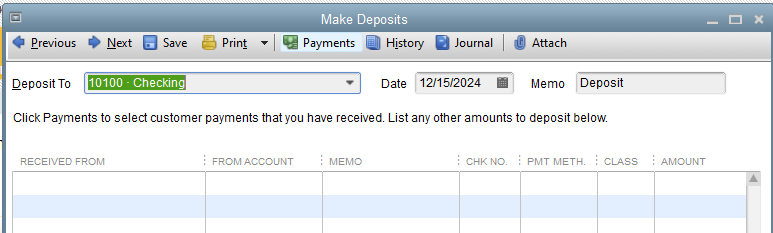
You can check out this article for detailed guidance on managing your deposits: Record and make bank deposits in QuickBooks Desktop.
Feel free to reach out if you need any further assistance with this.


You have clicked a link to a site outside of the QuickBooks or ProFile Communities. By clicking "Continue", you will leave the community and be taken to that site instead.
For more information visit our Security Center or to report suspicious websites you can contact us here


