Get 50% OFF QuickBooks for 3 months*

Buy now
cancel
Showing results for 
Search instead for 
Did you mean: 
Announcements
Simplify payday and set payroll to run automatically on QuickBooks.Explore Intuit QuickBooks Workforce
stevemontes1988
Level 1

Where are RULES and Auto RULES?

Where are rules?

1 Comment 1
ElykaJen_A
QuickBooks Team

Where are RULES and Auto RULES?

Welcome to the Community, Steven. You can find the Rules, along with the Auto-add feature, by navigating to the All app menu.

To find these features, go to All apps > Accounting > Rules. From this page, you can create a New rule or click Edit under the Actions column to enable the Auto-add toggle.
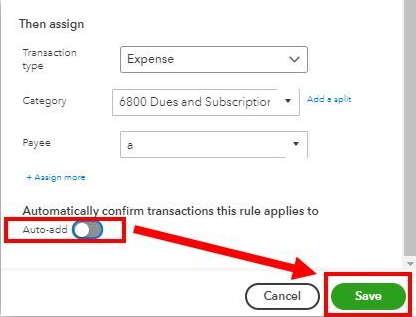

image.png


After you enable this, any transactions in the For Review tab that meet the specified conditions will be added automatically.


If you have additional questions or concerns, please leave a comment below.

Need QuickBooks guidance?
Log in to access expert advice and community support instantly.

Need to get in touch?

Contact us