I appreciate you for posting your concern here in the Community, Charlie. Let me show you how we can reconcile an account from the Banking menu without connecting it to online banking.
In QuickBooks Online (QBO), we can reconcile an account that isn't linked to a bank. This way, we can review your accounts to ensure they match your bank and credit card statements. If everything matches, we can guarantee that your accounts are balanced and accurate.
Here's how to reconcile an account from the Banking menu:
- In the Accountant view, go to Banking.
- Select the tile for the account you want to reconcile, and click Go to bank register.
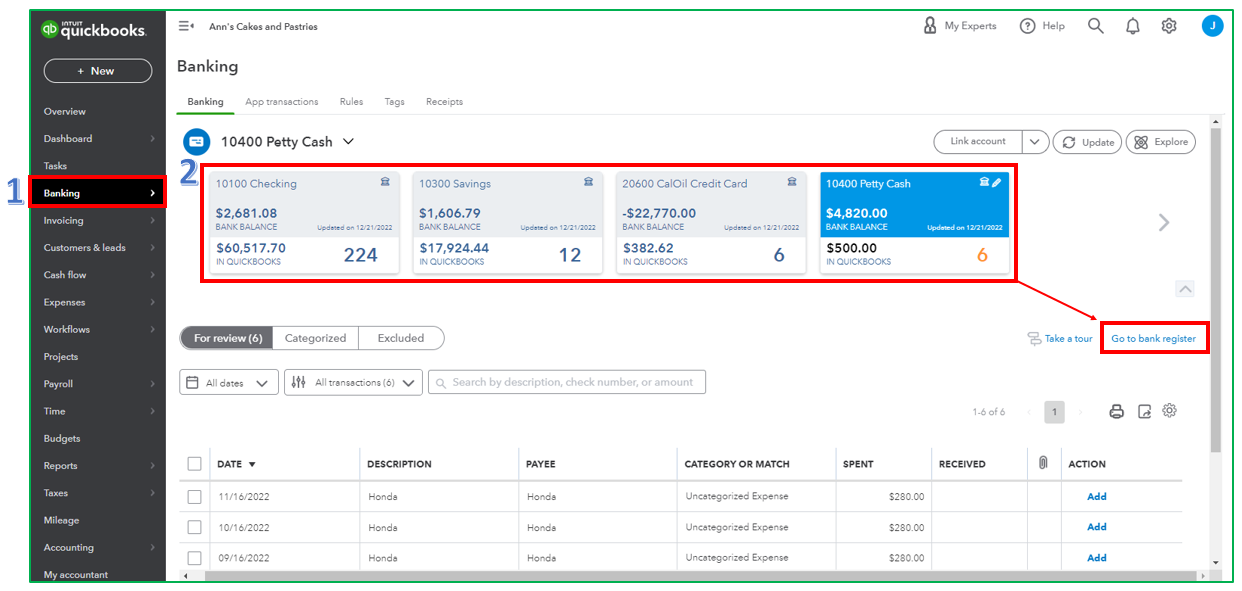
- Click Reconcile.
- Enter an Ending balance and an Ending date, then select Start reconciling.
- Begin with the first transaction from your statement. Locate the same transaction in the Reconciliation window. Once done, compare both transactions. Put a checkmark beside the amount in QBO if they match. Doing so will mark it as reconciled.
- If a transaction appears in QBO, but you don't see it in your statement, don't put a checkmark.
- Compare both transactions from your statement and with what's in QBO.
- The difference should be $0.00 once you've reached the end. If it is, select Finish now.
For a more detailed guide, feel free to read this article: Reconcile an account in QuickBooks Online
If you've encountered issues during reconciliation, I've got you some articles explaining the causes of the errors and how to fix them:
Please let us know in the reply section below if you have follow-up concerns about reconciling in QBO. The Community is always available to lend you a helping hand. Take care, and have a great day ahead!


