I do appreciate your time and effort in initiating some troubleshooting, jvolovec-bellsou.
Since you're done clearing the cache, let's open a private window or incognito tab to view these PDF files. This mode doesn't retain cache, so we can verify if it is a webpage issue. You can also use other supported browsers as an alternative.
Use these keyboard shortcuts:
- For Firefox, press Ctrl + Shift + P
- For Chrome, press Ctrl + Shift + N
- For Safari, hold down Command + Shift + N
Please also review the download attachment shown on the Downloads icon at the top-right side of the search bar. From there, you can drag the file to a new tab or paste it, then click Enter on your keyboard.
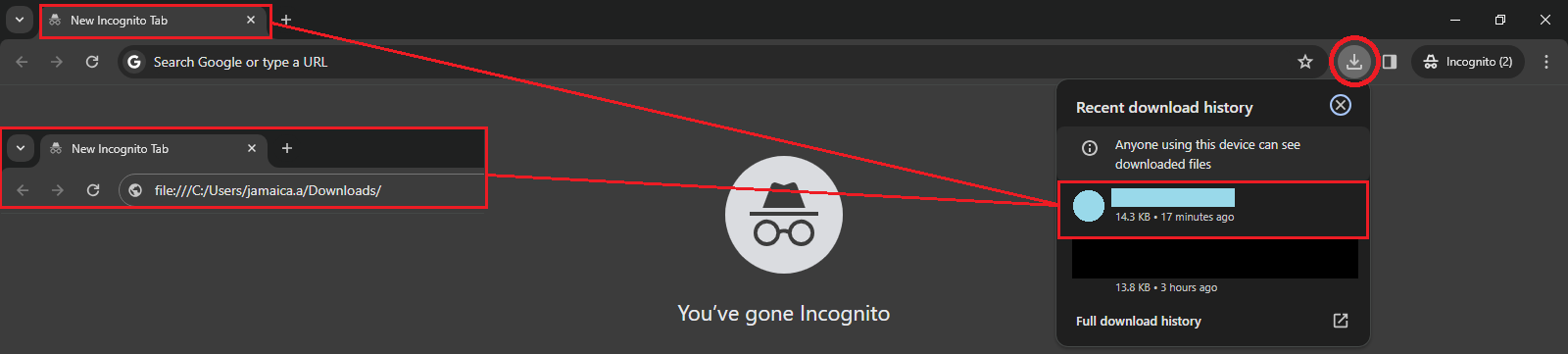
If this won’t work, it would be best to contact our Technical Support Team. They can pull up your account and conduct further investigation.
Here’s an article about editing or deleting attachments to customer and vendor profiles: Add or delete attachments in QuickBooks Online.
Shoot me a reply for any other PDF concerns or if you have other transaction concerns. I'm just around to assist you. Take care.


